


I keep a LAN messenger running on every network I'm responsible for — a workshop with no internet line, an office where the boss doesn't want staff chatter touching cloud servers, and one factory floor that legally can't connect to the internet at all. When the Wi-Fi dies or the ISP has an outage, these tools keep working, because they talk directly over the local network. The original version of this list was written in 2015; a few of those apps are gone now, and one excellent successor has appeared. Here's the updated 2026 field guide.
Quick answer: Softros LAN Messenger remains the best commercial choice for Windows LAN messaging in 2026 — polished, cross-platform, no server needed. BeeBEEP is the best free, open-source option and is actively maintained. Brosix suits teams wanting admin controls, LAN Messenger is the legacy fallback, WireNote adds sticky notes and USB-port control, and Briar is the modern pick for off-grid mesh messaging.
Why LAN messengers still matter in 2026
A LAN messenger sends messages between computers on the same local network — the office, school or factory network your devices already share — without any internet connection or cloud server. Slack and Teams are better for distributed teams, but they're useless the moment the internet drops, and they're non-starters for air-gapped networks where outside connectivity is forbidden.
Three reasons people still install these in 2026: reliability (chat survives outages and works on private subnets), privacy (nothing leaves the building), and legacy environments (warehouses, labs, factories and government sites that will never get cloud chat approved).
At a glance
| Messenger | Price | Best for | Actively maintained? |
|---|---|---|---|
| Softros LAN Messenger | From ~$5-10/user | Polished business LAN chat | Yes |
| BeeBEEP | Free, open source | The best no-cost option | Yes, actively |
| Brosix | Freemium (~$4-7/user) | Teams needing admin control | Yes |
| LAN Messenger | Free, open source | Legacy fallback | No — last release 2012-era |
| WireNote | Free | Notes + messaging + USB control | Quirky but alive |
| Briar | Free | Offline mesh via Wi-Fi/Bluetooth | Yes (Android + desktop) |
1. Softros LAN Messenger — best overall for business
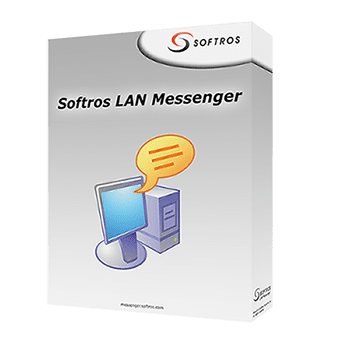
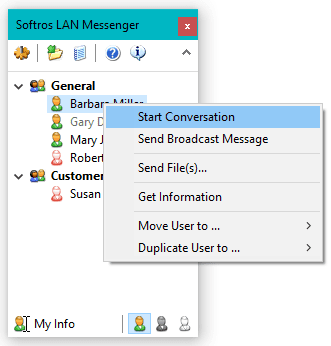
Softros has been the commercial LAN-messenger staple for two decades and it shows in the details: install it on every Windows PC (macOS and mobile apps exist too) and it discovers users on the network automatically — no server to deploy, no configuration. You get group chats, file and folder transfer, message history, broadcast messages from admins, and a remote desktop helper built in, which is why helpdesk teams like it.
It's paid per user (one-time licensing, roughly the cost of a coffee per seat), with a free trial for evaluation. If you want LAN messaging that looks professional and "just works," start at the Softros site.
Best for: small-to-mid businesses that want set-and-forget LAN chat on Windows.
2. BeeBEEP — best free and open source
BeeBEEP is the open-source LAN messenger this list deserved in 2015, and it's still actively developed — new releases were landing weeks ago at the time of writing. It's peer-to-peer: run the executable (no installation needed on Windows), and it finds everyone on the network. Group chat, offline message queuing, file sharing with resume, screen sharing, and a portable version you can run from a USB stick make it absurdly capable for free.
I've used it across mixed Windows/Linux labs and it's the first tool I install on any isolated network. Windows, macOS and Linux builds all come from its SourceForge page, where it still counts thousands of downloads a week.
Best for: anyone who wants a capable, current, free LAN messenger.
3. Brosix — best for team management features
Brosix sits between LAN messenger and team collaboration suite: unlimited-size file transfer, screen sharing, whiteboards, audio/video calls, and an admin console where you control users, contact lists and data trails. It can run in cloud mode or a private self-hosted/enterprise edition, which covers security-conscious teams who still want central management.
Pricing is per-user monthly with a free tier for small teams. If your "LAN messenger" is really "we need controlled internal chat with accountability," Brosix is the managed answer.
Best for: teams that need admin controls, logging and calls, not just messages.
4. LAN Messenger — the legacy fallback
The open-source classic simply called LAN Messenger is still downloadable from SourceForge — cross-platform (Windows/macOS/Linux), zero configuration, translation support in dozens of languages. But be clear-eyed: development effectively stopped over a decade ago (the last update is from the early 2010s), so expect cosmetic roughness on modern Windows and no fixes for any bug you find.
It still works fine on current Windows for basic chat and file transfer, and its simplicity is why techs keep it in the toolkit. For a new deployment, though, BeeBEEP gives you everything LAN Messenger does, actively maintained.
Best for: old machines, minimal installs, and rescuing a familiar tool one more time.
5. WireNote — messages plus sticky notes and USB control
WireNote is the odd one out: a lightweight messenger bundled with sticky notes, reminders, a to-do list — and, oddly, the ability to lock USB ports on networked machines. It's free, tiny, runs from the system tray, and suits workshop PCs where the admin wants note-pinning and device control as much as chat. The interface is dated and development is slow, but it's functional and costs nothing.
Best for: utility junkies and small networks that want notes + messaging in one tray app.
6. Briar — the modern replacement for TorChat
The original list recommended TorChat, which has been unmaintained for years and shouldn't be installed today. Its spiritual successor is Briar: a privacy-focused messenger that connects peer-to-peer over Wi-Fi, Bluetooth or Tor when the internet is gone entirely — designed by privacy organisations for exactly the off-grid use case. It's Android-first, with a desktop app available, and messages sync device-to-device without servers.
It's not a Windows-desktop LAN messenger in the Softros sense (no company directory, no admin console), but for protest-proof, disaster-proof, or simply internet-less messaging, nothing current beats it.
Best for: phone-based mesh messaging when networks and the internet are down.
What changed since our 2015 list
- TorChat is out — unmaintained and not recommended; Briar replaces it.
- Tonic is gone — the once-listed Tonic messenger has vanished; no current download or site.
- BeeBEEP arrived — the biggest improvement to this category in a decade, and it's free.
- Softros and Brosix endured — both are still in active development, which is remarkable for this niche.
How to choose in one pass
1. Business Windows network, want it to just work: Softros.
2. No budget, want active development: BeeBEEP.
3. Need admin control, logs, calls: Brosix.
4. Reviving ancient hardware: LAN Messenger.
5. Notes/reminders/USB control in the tray: WireNote.
6. Off-grid phone mesh: Briar.
One security note from experience: LAN messages are unencrypted on many legacy tools, which means anyone sniffing the network can read them. For sensitive environments, prefer tools offering encryption (BeeBEEP has it, Softros supports secure mode, Brosix encrypts transit) — and for the love of sanity, don't send passwords over a decade-old messenger. Meanwhile, if your team is half-remote, pairing a LAN tool with cloud chat is common; our pieces on WhatsApp file sharing, remote-work productivity tools and network switch features cover the connected side.
Frequently asked questions
What is a LAN messenger?
It's a chat application that sends messages directly between computers on the same local network, without an internet connection or central cloud server. Devices discover each other via broadcast on the network, so you can exchange texts, files and alerts even when the internet is down or intentionally absent — which is why factories, labs, schools and offices with connectivity restrictions still rely on them.
Is there a free LAN messenger that's still updated?
Yes — BeeBEEP. It's open source, works on Windows, macOS and Linux without installation, and has been receiving updates continuously into 2026, with group chat, offline queuing, file transfer and screen sharing. It's the strongest free option on this list and the safest replacement for abandoned classics like LAN Messenger or TorChat.
Do LAN messengers work without internet?
That's their whole point: they only need the local network (router or switch) to function, not a WAN link. Caveats from experience: client isolation on guest Wi-Fi can block device-to-device traffic, and some mesh tools like Briar use Wi-Fi Direct or Bluetooth instead of a router — useful when there's no network infrastructure at all.
Is LAN messaging secure?
Depends entirely on the tool. Legacy options (LAN Messenger, WireNote, classic NetSend-style tools) send mostly unencrypted traffic that anyone sniffing the network can read. Modern picks do better: BeeBEEP offers encryption, Softros supports secured communication, and Brosix encrypts in transit. On sensitive networks, enable encryption and treat unencrypted legacy messengers as postcards, not envelopes.
Can LAN messengers transfer files?
All six tools here can, but capability varies: Softros and BeeBEEP handle large files with transfer history, Brosix allows unlimited-size transfers with management features, and Briar syncs files device-to-device offline. For heavy daily file distribution across a factory or office network, Softros or BeeBEEP is the dependable route — no cloud quota, no upload wait.
Related reading
- Send full-resolution images on WhatsApp
- 8 best productivity tools and apps for remote work
- 7 key network switch features that unlock your network
I've deployed BeeBEEP on three air-gapped networks and Softros on two office ones — tell me your setup (OS mix, user count, internet policy) in the comments and I'll recommend the fit.





Would love to suggest one more best lan messenger tool Output Messenger here. Really, it offers all required business communication features to improve the team collaboration along with self-hosted chat server.
Good list.
I’ll suggest you also add Feem v4 (http://www.feem.io/best_lan_messenger.html) .
Unlike all the other options you listed above, Feem works on all platforms (mobile, tablet, desktop).
Feem support resumable file and folder transfers.
Also, all Feem communications are encrypted.
Finally Feem supports creating a hotspot even when there is no router.
Let us know what you think.