My team has been fully remote for four years, and I've watched us cycle through most of the tools on this list — the lesson from that experience is that the "best" tool is the one your team will actually open every morning, not the one with the longest feature list. In 2026 the remote-work stack has also consolidated: one tool often covers tasks, docs, and chat that used to need three subscriptions. Here are the eight that earn their place, with what each costs and who it genuinely fits.
Quick Answer: The best productivity tools for remote work in 2026: ClickUp (all-in-one tasks, docs and goals), Asana (structured project tracking), Monday.com (visual workflows), Trello (simple kanban), Slack (team chat), Zoom (video meetings), Notion (docs and wikis), and HubSpot (CRM for client-facing teams). All have capable free tiers; paid plans run roughly $5–11 per user/month.

The 8 Best Remote Work Tools at a Glance
| Tool | Job | Price (entry paid tier) | Best for |
|---|---|---|---|
| ClickUp | All-in-one workspace | ~$7/user/mo | Teams consolidating tools |
| Asana | Project management | ~$10.99/user/mo | Structured, process-driven teams |
| Monday.com | Visual workflows | ~$9/seat/mo | Workflow-heavy operations |
| Trello | Kanban boards | ~$5/user/mo | Simplicity lovers |
| Slack | Team chat | ~$7.25–8.75/user/mo | Day-to-day communication |
| Zoom | Video meetings | ~$13.33/mo per host | Calls, webinars, clients |
| Notion | Docs, wikis, databases | ~$10/seat/mo | Company knowledge base |
| HubSpot | CRM & client work | Free CRM; paid hubs | Sales and support teams |
1. ClickUp — Best All-in-One for Consolidating Your Stack
ClickUp is the tool I'd pick today if starting from zero: tasks with multiple views (list, kanban, Gantt, calendar), native docs and wikis, whiteboards, goal tracking, and time tracking in one subscription. The consolidation is the point — many remote teams replace two or three subscriptions with it. The trade-off is real: ClickUp's depth makes it the heaviest tool here, and initial setup takes a weekend of honest configuration. The free tier is genuinely usable for small teams; Unlimited runs about $7/user/month. Check ClickUp's site for current tiers.
Best for: remote teams that want one tool instead of four and will invest setup time.
2. Asana — Best for Structured Project Management
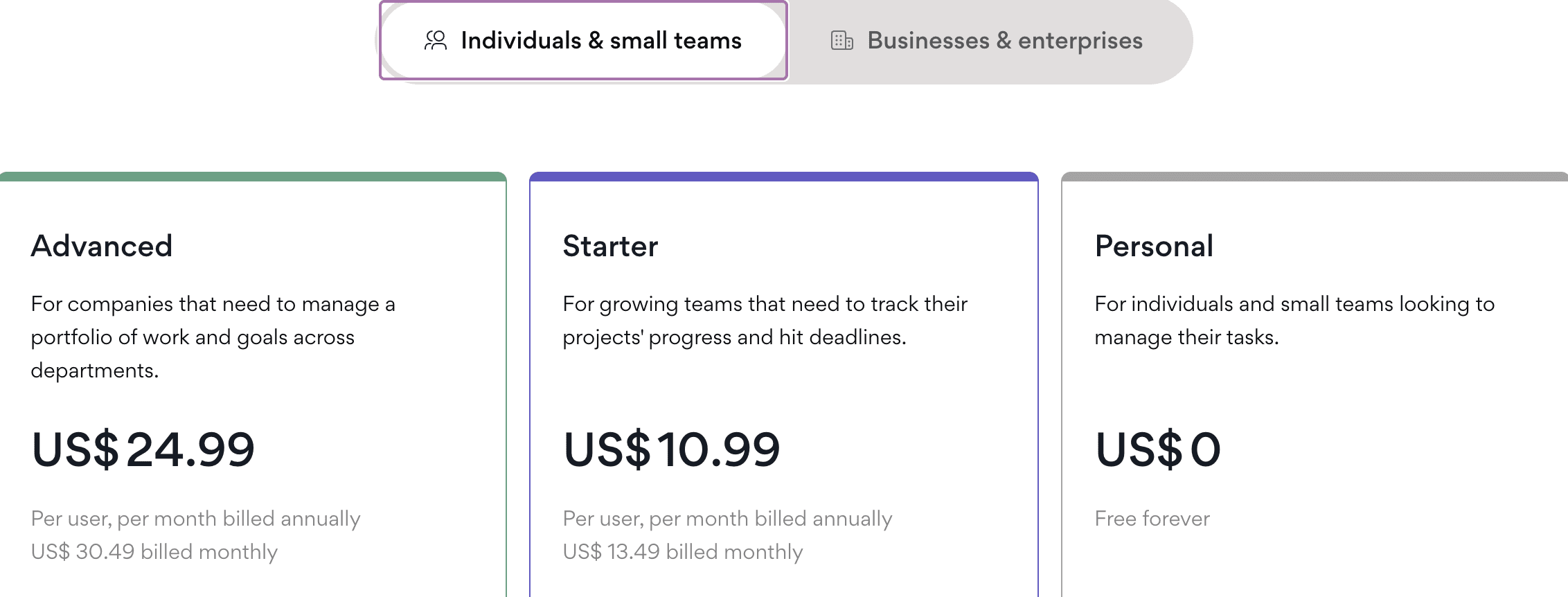
Asana remains the reference for teams that think in projects, owners, and deadlines: task dependencies, timelines, workload views, and reporting that answers "are we on track?" without a meeting. It's more opinionated than ClickUp — less flexible, more immediately coherent — which is exactly why process-driven teams stick with it. Free for up to 10 users; Starter around $10.99/user/month.
Best for: teams that run on clear processes and want progress visible to everyone.
3. Monday.com — Best for Visual Workflow Management
Monday.com turns workflows into colorful, spreadsheet-like boards that non-technical teammates actually maintain — the adoption argument that decides most tool rollouts. Automations ("when status changes to Done, notify the client channel") are its signature, and it stretches from marketing calendars to sales pipelines. Pricing starts around $9/seat/month with a two-seat minimum on the free-adjacent tiers.
Best for: operations and mixed-skill teams that live in boards and automations.
4. Trello — Best for Keeping It Simple
Trello is the kanban board that a five-person team can adopt in ten minutes: cards, lists, drag-and-drop, done. Power-Ups add calendars and integrations, and automation via Butler covers repetitive moves. It won't run a 40-person product org — and doesn't try to. Free tier is generous; Standard is about $5/user/month, the cheapest paid tier on this list.
Best for: small teams and simple pipelines where heavyweight tools would be friction.
5. Slack — Best for Day-to-Day Team Communication

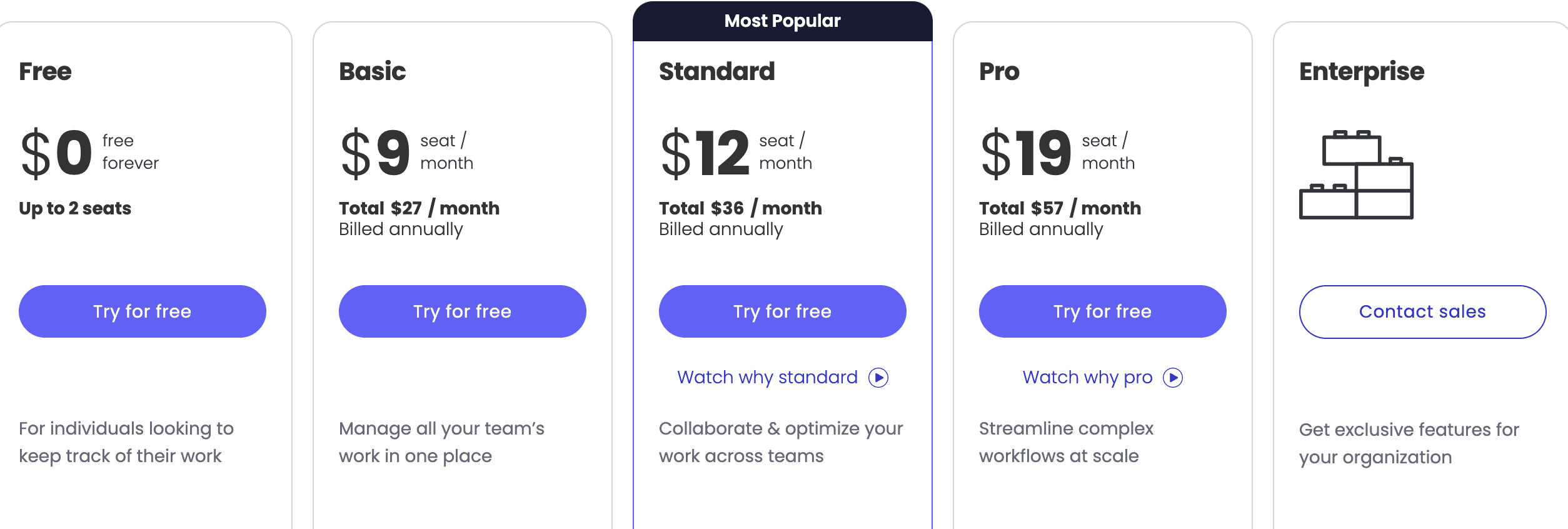
Remote teams run on chat, and Slack remains the standard: organized channels, thread discipline, huddles for quick audio calls, and integrations that pipe ClickUp, Asana, and GitHub notifications where people already are. The free tier's 90-day message history limit is the catch that eventually pushes growing teams to Pro (~$7.25/user/month billed annually). See slack.com for current plans.
Best for: the communication layer every remote team needs on day one.
6. Zoom — Best for Video Meetings That Just Work
Years into the video-call era, Zoom is still the reliability benchmark for remote meetings: better behavior on weak connections, breakout rooms, recording and transcripts, and webinar tooling for anything client-facing. The free 40-minute meeting limit is fine for quick check-ins; Pro runs about $13.33/month per host billed annually — current plans are on zoom.us.
Best for: teams with external client calls and webinars, or anyone tired of dropped calls.
7. Notion — Best for Docs and Company Knowledge
Where do new teammates find the process doc, the onboarding checklist, the decision log? For a growing share of remote companies, the answer is Notion: wiki-grade docs, databases, and project tracking in one flexible workspace. It's less structured than Asana by design — you build what your team needs, and AI features (paid add-on) now draft and summarize inside it. Free for personal use; Plus around $10/seat/month.
Best for: teams drowning in scattered docs who want one source of truth.
8. HubSpot — Best for Client-Facing Teams
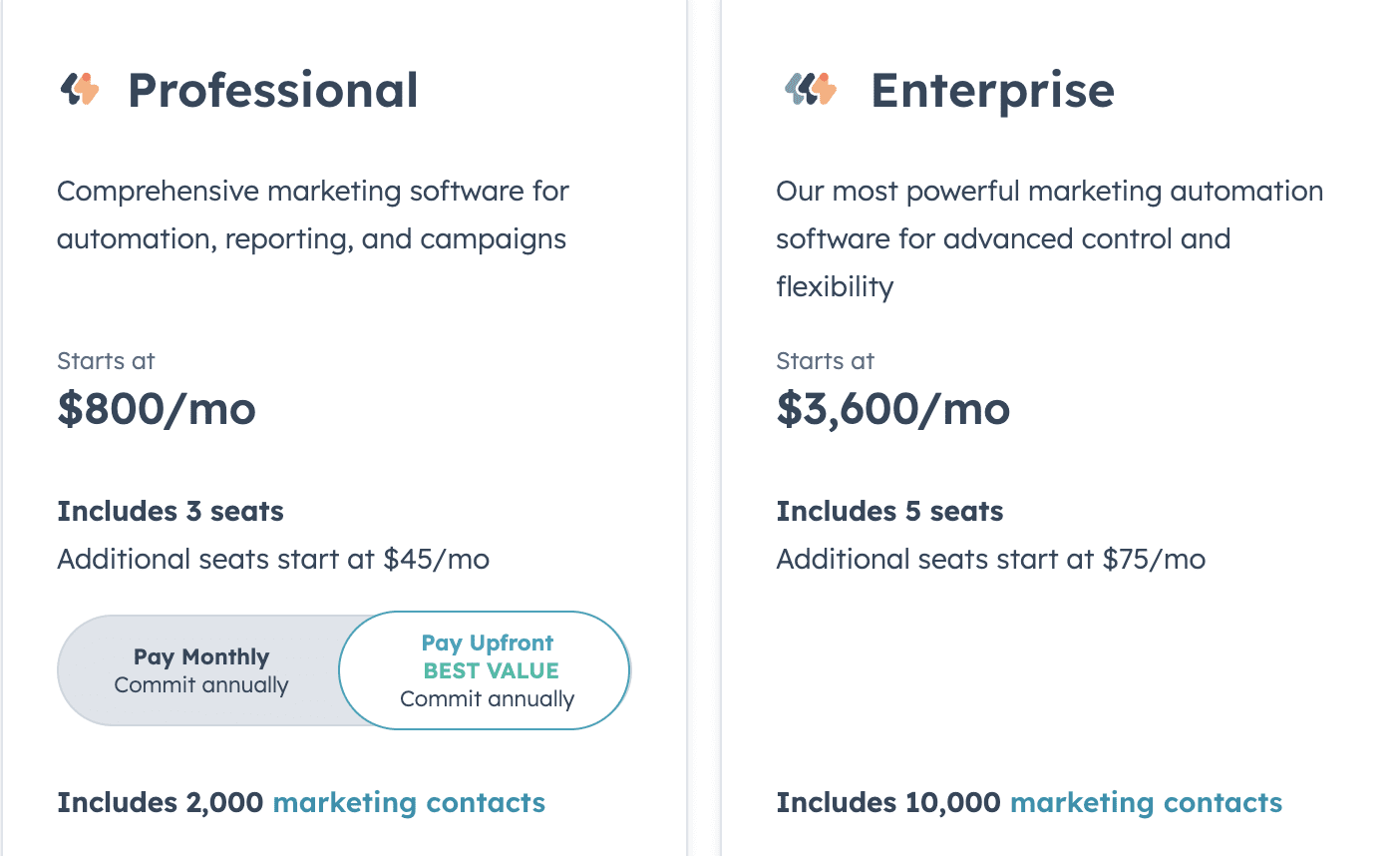
Remote sales and support teams need a shared CRM more than another task board, and HubSpot's free CRM is the most capable no-cost option anywhere: contact management, deal pipelines, email tracking, and meeting scheduling. The paid hubs (starter tiers around $15–20/seat/month) add automation when growth demands it. If part of your remote team talks to customers, this is the tool that keeps everyone honest about follow-ups — and its predictive lead-scoring features tie in nicely with what AI is doing for sales and CRM.
Best for: remote sales, support, and founder-led selling.
How to Choose (Without a Month of Trials)
1. One tool instead of many? ClickUp, with Notion as the runner-up for doc-heavy teams.
2. Process and reporting discipline? Asana.
3. Non-technical team, board-driven work? Monday.com or Trello.
4. Start with the communication layer regardless: Slack + Zoom are the baseline stack most remote companies build on.
5. Whatever you pick: run a two-week pilot with one real project. Tool rollouts fail on adoption, not features — and the team that has to live in it should choose it.
Also Worth a Look
- Yoroflow — a workflow and task management platform (yoroflow.com) with time tracking, status tracking, and automation; its companion YoroConnect handles email-marketing campaigns. Worth evaluating if you want workflow plus email marketing from one vendor.
- Google Workspace — still the quiet default for docs-and-email-first teams; pair it with Trello or Asana rather than replacing it.
FAQ
What are the best productivity tools for remote work in 2026?
The core stack most remote teams settle on: ClickUp or Asana for project management, Slack for chat, Zoom for video, and Notion for documentation — with HubSpot added for client-facing work. All eight tools in this guide have free tiers, so a small team can run the whole stack at zero cost until growth demands paid features.
How much should a remote team spend on productivity tools?
A lean remote team pays roughly $15–30 per person per month for a full stack: Slack (~$7.25), a project tool ($5–11), and Zoom Pro shared across the team. Consolidating onto ClickUp or Notion can pull that under $15. The bigger cost is attention — every additional tool adds context-switching, so fewer, well-adopted tools beat a bargain-bin pile of subscriptions.
Is ClickUp better than Asana for remote teams?
They optimize for different things. ClickUp consolidates more (docs, whiteboards, goals, time tracking) and costs less per user, but needs real setup effort and can overwhelm small teams. Asana is faster to adopt, clearer out of the box, and better at cross-team visibility — but deeper functionality requires paid tiers and add-ons. Choose ClickUp to consolidate, Asana for process discipline.
Can I run a remote team entirely on free plans?
Yes, up to roughly 10 people: ClickUp, Asana, Trello, Notion, and HubSpot all have genuinely usable free tiers, and Slack's free plan works until your message history matters. The first paywall most teams hit is Slack's 90-day history limit, followed by Asana's 10-user free cap. Zoom's 40-minute meeting limit is the most disruptive free constraint — budget for Zoom Pro before anything else.
What's the difference between Monday.com and Trello?
Both are visual boards, but Monday.com is a workflow engine: dependencies, multiple view types, formula columns, and heavyweight automations for teams running operations. Trello is a kanban board — lighter, cheaper, and learnable in minutes, but limited to card-based pipelines. Teams under about 10 people with simple flows are happy on Trello; anyone managing multi-step, recurring workflows across roles will outgrow it.
Do these tools work well together?
Yes — integration is where this list quietly shines. Slack receives notifications from ClickUp, Asana, Trello, and Zoom natively; Zoom links attach to calendar meetings; Notion embeds task databases; HubSpot syncs contacts into any of them via Zapier-style automation. The practical pattern: pick one project tool as the source of truth, pipe its notifications into Slack, and resist duplicating the same task in two systems.
Related Reading
- How Remote Work Software Allows Easy Micro-management of Tasks
- Benefits and Drawbacks of Remote Work
- Why Fast Broadband Is Essential for Remote Workers
- AI's Impact on Sales and CRM: Predictive Analytics
I've rolled out three of these tools across two companies — the graveyard of unused licenses is real, so ask me about your team size and workflow in the comments before you buy anything.