Quick answer
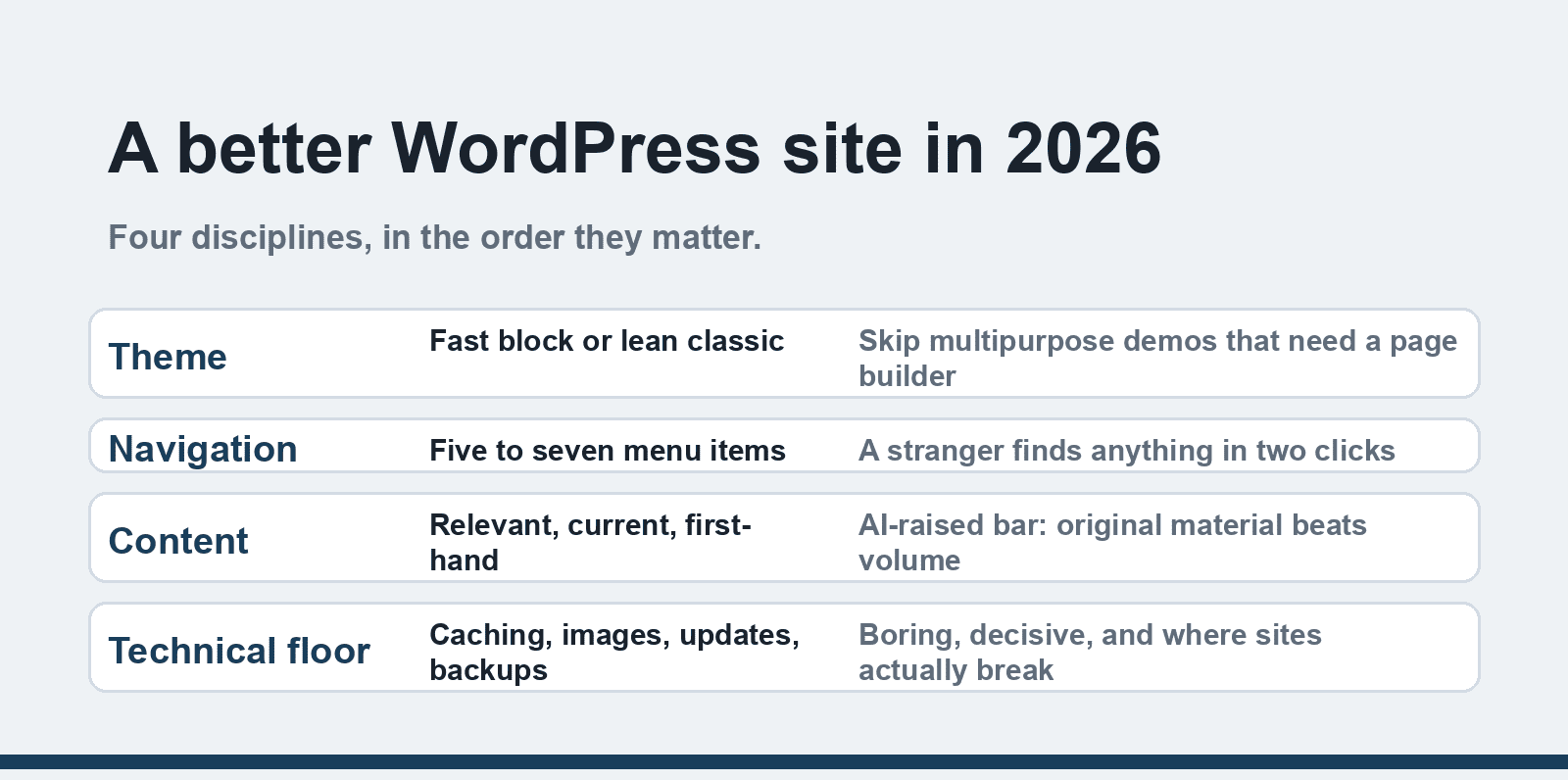
A better WordPress website in 2026 comes down to four disciplines: a lightweight theme (block-based beats bloated multipurpose), navigation a stranger can use in one visit, content that stays relevant and proves first-hand experience, and the technical floor — caching, image optimization, updates and backups. WordPress core ships most of it; your theme and plugin choices decide the rest.
WordPress powers more of the web than any other platform, which means the margin between a good WordPress site and a mediocre one is mostly discipline, not budget. The four tips below are the ones that survive contact with real sites, updated for what changed by 2026 — block themes and Full Site Editing are now mainstream defaults, Core Web Vitals feed rankings, and AI-assisted content has raised the bar for what "relevant content" means.
Written from years of maintaining WordPress sites, watching which decisions pay off and which generate support tickets.
1. Choose a theme built for speed, not a demo
The theme decision outweighs every other design choice because it sets the performance ceiling. The 2026 divide is between block themes (built on Full Site Editing, native to core) and classic themes, and between lightweight builds and "multipurpose" monsters that bundle 30 demo layouts and a page builder.
What to pick:
- Block themes (Twenty Twenty-Four/Twenty-Five, GeneratePress Blocky equivalents, Ollie, Frost) load less CSS/JS and edit visually through the Site Editor — the direction WordPress itself has chosen.
- Lightweight classic themes (GeneratePress, Astra, Kadence) remain excellent, with mature customization and plugin ecosystems.
- Avoid any theme whose demo requires a bundled page builder to look like the screenshot — you inherit its code forever.
Your brand layer — colors, typography, spacing — takes an afternoon in either route. The mistake to skip is buying a $60 multipurpose theme because its demo was pretty; that demo becomes the site's diet.
2. Navigation: a stranger should find things in two clicks
Navigation fails quietly: menus with eight top-level items, "Services" pages that list everything without saying what anything costs, footers with 40 links. The fixes are unglamorous and effective:
- One primary menu, five to seven items, ordered by what visitors need rather than by org chart.
- Breadcrumbs on content-heavy sites (most SEO plugins render them) — they orient both visitors and crawlers.
- An About page with real names and faces, and a Contact page with an address, a response-time promise, and a form that works. These two pages carry disproportionate trust weight; stale ones carry negative weight.
- A search that works, for anything with more than ~30 pages.
Test it honestly: hand your phone to someone who has never seen the site and ask them to find one specific thing. Their first hesitation is your navigation bug.
3. Content: relevant, current, and actually yours
"Publish regularly" was always half the advice; the 2026 version is stricter because AI-generated filler flooded every niche and search systems got better at detecting it. What ranks and converts now is content with first-hand experience: your actual process, your real screenshots, your numbers. A WordPress blog that publishes two posts a month with original material outperforms one that publishes daily summaries of other people's work — our piece on AI automation in WordPress covers using AI as a drafting assistant without becoming one.
Structure serves this too: descriptive H2/H3s, short paragraphs, images with meaningful alt text, and an update rhythm where old posts get refreshed rather than left to rot. Relevant content is not a trick; it is the site answering the questions its visitors actually have.
4. The technical floor: boring, decisive
Nothing else matters if the site is slow, broken, or hacked. The 2026 floor:
- Caching. A caching plugin (LiteSpeed Cache on LiteSpeed hosts, WP Rocket, or the free Cache Enabler) plus decent hosting turns WordPress fast. Hosting is the foundation: our WordPress hosting guide covers what to look for at each budget.
- Images. Serve WebP/AVIF (most caching plugins or an optimization plugin convert automatically), size images to their display width, and lazy-load below-the-fold media.
- Measure with Core Web Vitals. PageSpeed Insights and Search Console show the real-user numbers: LCP under 2.5s, INP under 200ms, CLS under 0.1. Fix what the report flags before guessing.
- Updates and backups. Core, themes and plugins updated weekly (with a backup first); automatic daily off-site backups. An un-updated WordPress site is the most common hacked-site story there is, and a hacked site undoes every other improvement here.
- Trim the plugin list. Every plugin is code you run on every page load. Ten well-chosen plugins beat forty; deactivate-and-delete anything unused (deactivate alone leaves the files).
For the custom-build decision behind all of this — page builder versus custom theme versus plain block editing — our comparison of custom code vs page builders in WordPress development weighs the tradeoffs, and migrating from another platform starts with our Drupal-to-WordPress migration tips.
FAQ
What is the best WordPress theme for 2026?
For most sites: a lightweight block theme or a lean classic theme like GeneratePress, Astra or Kadence. "Best" is the one that loads fast, matches your content structure, and does not require a bundled page builder. The Twenty Twenty-Five default theme is genuinely good and free.
How do I make my WordPress site faster?
In order of impact: better hosting, a caching plugin, WebP image optimization, and trimming plugins. Measure with PageSpeed Insights before and after, and chase the Core Web Vitals numbers (LCP, INP, CLS) rather than plugin scores.
How often should I update WordPress plugins?
Check weekly and update promptly with a backup taken first — security releases in particular should go out same-day. Automatic updates for trusted plugins plus weekly manual review is a common sustainable setup.
Do I still need a page builder like Elementor?
Less than before. The WordPress Site Editor now handles layouts that used to require page builders, and block themes avoid the code bloat builders add. Elementor remains valid for pixel-perfect custom designs, but starting a new site on a page builder is no longer the default choice it was.
How do I know if my WordPress site has been hacked?
Warning signs: unknown admin users, files you did not create, redirects to odd domains, new links in your content, sudden search-console security warnings, or hosting suspensions. Run a scanner (Wordfence or your host's malware scan), restore from a pre-infection backup, and update everything.
What should I do first to improve an existing WordPress site?
Run PageSpeed Insights and a security audit, update everything with a fresh backup, and fix whatever the Core Web Vitals report flags. Then work down this list: theme weight, navigation clarity, content freshness. One discipline at a time beats a simultaneous rebuild.