

This page used to hand out a MediaFire link to an Angry Birds 2 mod build, version 2.40.1, with a cache file to copy into an OBB folder. That was 2020. The file is gone, the install steps no longer match how Android delivers games, and the reason people wanted it — unlimited gems and energy — is still the reason hundreds of other pages offer the same thing today.
So the useful version of this page is not another download link. It is an explanation of what those files are, why they break faster now than they did six years ago, and what to do if you already installed one.
Quick answer: there is no Angry Birds 2 MOD APK worth installing in 2026. The game is free from Google Play, still updated, and the modded copies circulating on APK sites are re-signed builds that cannot update, are ten times more likely to be flagged as malicious by security tooling, and put your Rovio account at risk. If a page promises unlimited gems, it is selling you an installer with someone else's code inside it.
The game is free, current, and still owned by the same studio name
The Play Store listing tells you most of what you need before you go looking for a hack. As of late October 2026, Angry Birds 2 is published by Rovio Entertainment Oy, rated 4.1 stars across roughly 6.32 million reviews, has passed 100 million downloads, carries an Editors' Choice badge, and was last updated on 20 October 2026. It is free, with ads and in-app purchases.
Two details matter more than the rest.
The first is the update date. A game that shipped a new build nine days ago is a game whose modded copies are nine days stale, and the patch has to be redone from scratch for every release.
The second is the ownership. Sega completed its €706 million acquisition of Rovio in August 2023, and the studio still trades under the Rovio Entertainment Oy name on the store listing. Nothing changed for players, but it does mean the game now sits inside a larger publisher with a legal team that cares about modified clients.
What a MOD APK physically is
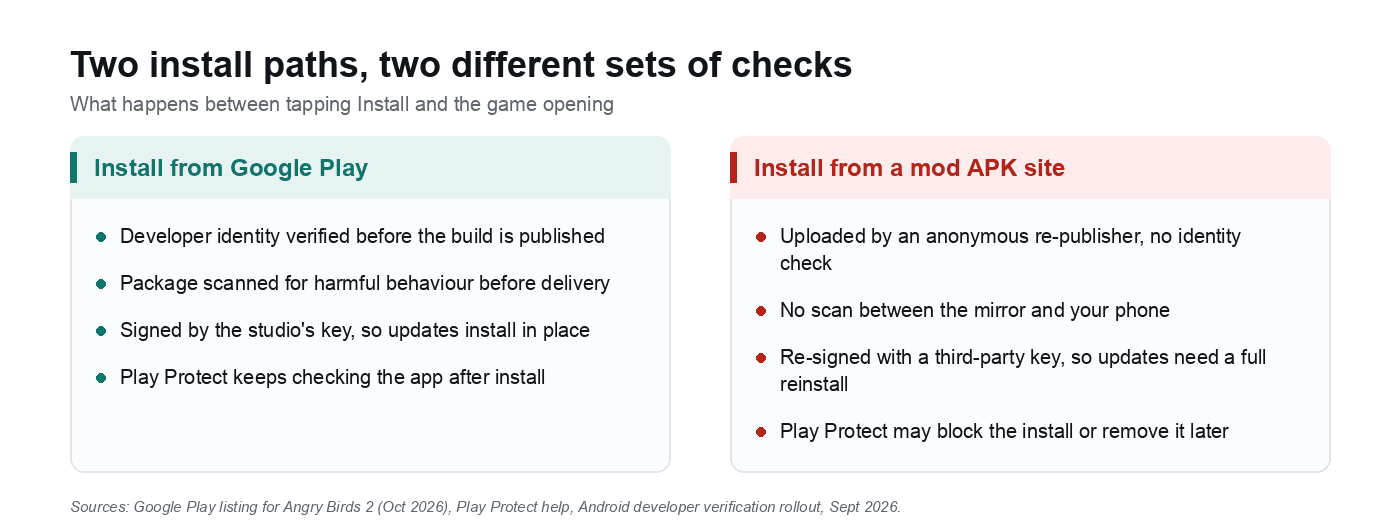
A mod APK starts as the real application package, gets decompiled, has its resource values and sometimes its code changed, and is then re-signed with the modder's own key. That last step is the one nobody mentions.
Android identifies an app by package name plus signing certificate. Change the certificate and the operating system sees a different app that happens to share a name. This is why every mod tutorial, including the one this page used to run, tells you to uninstall the official version first. It is not a preference. An in-place install is impossible, because the signatures do not match.
Once the package has been re-signed, nobody outside the mod site can tell you what else went into it. The original code is still in there, and so is whatever was added while the file was open.
What changed since this page recommended a 2.40.1 build
| The 2020 version of this page | What is true in 2026 |
|---|---|
| A single 193 MB APK plus a cache file copied into Android/obb | Google Play has required app bundles for most new apps since 2021, and a bundle is delivered as several split APKs matched to the device. There is no single file to swap, which is why the old OBB steps fail |
| Sideloading needed one "install unknown apps" toggle | Android developer verification: from 30 September 2026, apps from unverified developers are blocked on certified devices in Brazil, Indonesia, Singapore and Thailand, with a global rollout in 2027 |
| Play Protect scanned the phone but rarely blocked anything | Play Protect can now refuse to install an unverified app that asks for sensitive permissions, and can deactivate or remove apps it considers harmful |
| Modded apps were "probably fine if the site looked legit" | The ModZoo study of 146,000 apps from 13 mod markets found around 90% were altered, and modded apps were ten times more likely to be flagged as malicious |
| Rovio was an independent Finnish studio | Sega has owned Rovio since August 2023, and the game is still actively developed |
That first row is worth dwelling on, because it explains the error messages. People follow a 2020 tutorial, download one APK, and get "app not installed" or a game that opens to a black screen. The file is not necessarily malicious. It is often just incomplete, because the device expected three or four split packages and got one.
Three places a modded build now fails
Developer verification. Google's verification rollout is the biggest change since this article was written. From 30 September 2026, on certified Android devices in Brazil, Indonesia, Singapore and Thailand, apps that are not registered to a verified developer will not install from participating stores. The rest of the world gets the same treatment during 2027. Google built an advanced flow for people who deliberately want to load software from unverified developers, and it is deliberately slow: enable developer mode, confirm nobody is coaching you, restart the phone, wait a day, then re-authenticate with biometrics or your PIN. It can be enabled for seven days or indefinitely, and the install warning still appears. Every "download and install in two minutes" page is now describing something that cannot happen on a certified device in those four countries.
The update path. Because the mod carries a different signing key, the Play Store treats it as an unrelated app. You cannot update it. You wait for the mod site to rebuild against the new version, uninstall, lose local data, and reinstall. Angry Birds 2 saves progress against a Rovio account rather than the APK, so a legitimate account survives the cycle, but anything the modded client reported to the server travels with your account too.
Play Protect. Google's Play Protect documentation is blunt about what the service does: it checks your device for potentially harmful apps from outside the Play Store, warns you, and may deactivate or remove them. It is on by default. It also now blocks installs of unverified apps that request permissions commonly abused for financial fraud. A mod that asks for accessibility access, overlay drawing or SMS reading is exactly the profile that gets stopped.
The risks that do not appear in the screenshots
The screenshots on mod sites show a gem counter. The part you cannot see is the code that shipped alongside it.
The ModZoo study, published at the 2024 Symposium on Electronic Crime Research, collected more than 146,000 apps from 13 of the most popular modded app markets. About 90% differed from the official build. Around 5% were paid apps being redistributed free, and 3% had genuinely stripped trackers and ads. The headline finding is the one to remember: modded apps were ten times more likely to be marked as malicious than their official counterparts, and they routinely requested permissions the real app never asks for.
That matches what the ecosystem looks like from the other side. A modified advertising identifier is one of the most common changes in the dataset, because ad fraud is a business model with better margins than selling gems. Bundled loaders that install a second payload after a delay are another, and they are the reason a file can pass a one-off scan and still misbehave a week later.
Then there is the account. Rovio's terms prohibit modifying or tampering with the client, and nothing in a modded build runs offline — scores, event entries and purchases all reach Rovio's servers under your account. A ban is not guaranteed, but it is a risk you are accepting on an account you may have had since 2015.
And the money. Gem generators do not exist, because gems are server-side records, not a value in the APK. Every "unlimited gems tool" is a survey wall, an offer loop, or a page that asks for your Google credentials. If you have already typed a password into one, change it now and check the account's recent device list.
If you already installed one
Removing a modded build is straightforward once you know where to look, because these packages tend to leave hooks behind.
- Uninstall the app: Settings, Apps, Angry Birds 2, Uninstall. If the button is greyed out, it is registered as a device administrator. Go to Settings, Security, Device admin apps, switch it off, then uninstall.
- Audit accessibility: Settings, Accessibility, Downloaded apps. Revoke anything you do not recognise. Accessibility is the permission that lets an app read the screen and tap for you, and it is the first thing a malicious build asks for.
- Run a scan: open the Play Store, tap your profile, then Play Protect, then Scan. This covers apps installed from outside the store.
- Reinstall from Google Play and sign back into your Rovio account to pull progress back.
- Change your Google password if the mod site ever asked you to "sign in to claim" anything.
If this is not the first app you have had to clean up, the same routine covers the rest: the steps for spotting and removing a spy app on Android apply to any sideloaded package that behaves oddly.
The legitimate version of "unlimited gems"
There is no shortcut, but there are cheaper ways to play than buying gem bundles at full price.
- Play the events. Angry Birds 2 runs rotating collections and tournaments that hand out gems and chests for levels you were going to play anyway.
- Use the free chest timer. It is the slowest route and the only one that costs nothing.
- Buy the season pass rather than gems if you are going to spend at all, because it front-loads rewards instead of converting money into a single pull.
- If your goal is simply a good free game for a commute, there are plenty of free mobile games that do not need a hack to be enjoyable.
Sideloading itself is not the problem. Android still allows apps from outside the Play Store, and some genuinely useful tools are not published there — this list of apps that are not on the Play Store is a reasonable example of that. The difference is whether the source can be checked.
How to tell a dangerous APK page in ten seconds
- No version number, or a version older than the Play Store release. A mod site that cannot say which build it patched has not tested it.
- A file size that does not match the game. A 300 MB game offered as a 30 MB "lite mod" is a wrapper, not the game.
- Any "generator", "gem tool" or "online hack". Server-side currency cannot be edited from a browser.
- A human-verification step or survey before the download unlocks. That is the monetisation, and the APK is the afterthought.
- No checksums, no changelog, no contact page, and download links hosted on three different mirror domains.
- Comments clustered in the same week, all praising the file and none mentioning bugs.
For the wider picture of what these packages can do once they are running, this explainer on how malware works and how to stay safe is a better use of ten minutes than any download page.
Related reading
- Spotting and removing a spy app on Android
- Android apps that are not on the Play Store, and why
- What malware actually does, and how to avoid it
- Free mobile games worth installing instead
FAQ
Is downloading a mod APK illegal?
It is a copyright problem more than a criminal one in most countries. You are copying and running a modified version of software you do not have a licence to modify, which breaches the developer's terms and can expose you to a civil claim in jurisdictions that enforce it. Distributing the modified file is the bigger legal risk, which is one reason the sites that host them disappear and reappear under new domains.
Why does the mod APK say "app not installed"?
Three common causes, in order of likelihood. The official version is still installed, so the signing certificates conflict — uninstall it first. The download is a single APK for a game that ships as split packages, so the installer is missing components. Or the device is in one of the developer-verification rollout countries and the package is not registered to a verified developer, in which case no amount of retrying will help.