I've used MiniTool Partition Wizard on and off since 2019 — most recently to resize a cramped C: drive on a client's Windows 11 laptop and to clone a failing HDD to an SSD the weekend before it died — so this refreshed 2026 review is written from real usage, not the feature list. Short version: it remains one of the easiest partition managers on Windows, with the usual catch that the headline features live in the paid tiers.
Quick answer: MiniTool Partition Wizard is a polished Windows partition manager with a genuinely simple interface. The Free edition handles basics (create, delete, format, wipe, align); the paid Pro tier ($59/year, 1 PC) unlocks the features most people actually need — resizing and moving partitions including the system drive, and MBR/GPT conversion — and Pro Ultimate ($159, perpetual) adds OS migration and full-disk cloning. Windows 11 is fully supported.

Review updated September 2026 — tested on Windows 11 (24H2-era build) with current pricing verified on the official site.
What MiniTool Partition Wizard is
Partition Wizard is MiniTool's Windows utility for managing disks and partitions: creating, deleting, formatting, resizing, moving, copying, converting and wiping partitions from a single window instead of Disk Management's austere menus. It sits in the same category as AOMEI Partition Assistant and EaseUS Partition Master, with a reputation for the cleanest interface of the three.
The company sells it in tiers — Free, Pro, Pro Ultimate, plus Business and bootable-media editions — and the tier boundaries matter more than the marketing, so let's start there.
Pricing in 2026
| Edition | Price | What you get |
|---|---|---|
| Free | $0 | Create/delete/format/wipe partitions, space analyzer, surface test |
| Pro | ~$59/year, 1 PC | Resize/move partitions (incl. system), extend, split/merge, MBR↔GPT convert |
| Pro Ultimate | ~$159 (from $199), perpetual | Everything in Pro + migrate OS to SSD/HDD, copy disk/partitions |
| Business/Bootable tiers | ~$109-699 | Commercial use, bootable media, server support |
Prices verified on partitionwizard.com in September 2026 — the Pro Ultimate perpetual licence was discounted from $199 to $159 at the time of writing. Watch the Pro tier's annual model: the perpetual Pro Ultimate pays for itself in your third year if you keep the tool.
Key features, tested
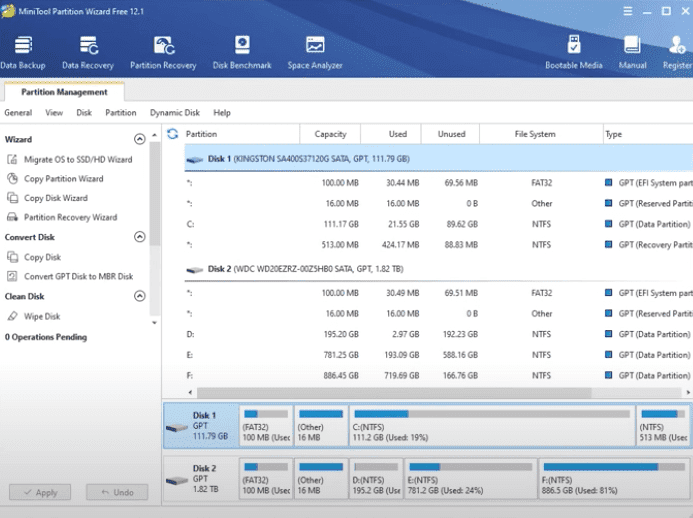
The interface is the selling point. Disk Management, Windows' built-in tool, shows you operations through right-click menus that grey out at confusing moments. Partition Wizard shows every disk as a coloured bar with all applicable operations listed in a left-hand panel — greyed-out ones included, so you can see what's paywalled without guessing. On the Windows 11 machine I tested, every action is wizard-driven with sensible defaults.
Resizing and moving partitions (Pro): the feature I've used most. Extending a system C: drive when it fills up is the classic home-user emergency, and Windows' own Disk Management can only extend into unallocated space that sits immediately adjacent — which it almost never does. Partition Wizard moves and resizes regardless of layout, queuing operations and applying them on reboot when the system partition is involved. My C: drive expansion (D: shrunk, gap moved, C: extended) took one queued batch and one reboot, with data intact.
MBR/GPT conversion (Pro): converting a data disk between partition styles without deleting everything first. Useful for prepping older drives for UEFI systems — with the standard caveat that converting a system disk still has Windows-side prerequisites.
OS migration and disk cloning (Pro Ultimate): copy an entire Windows installation to a new SSD or HDD. This is the tier for upgrade season; the migration walked my test laptop's Windows install onto an SSD and booted first try. Third-party tools all do this, but Partition Wizard's wizard is friendlier than most.
Space analyzer (Free): a WinDirStat-style visual map of what's eating your disk — genuinely useful, and one of the better free perks. Wipe and surface test (Free): secure-ish wiping for old drives and bad-sector scanning before you trust a disk with data.
FAT↔NTFS conversion (Free/Pro depending on operation): handy for older flash drives, though you should still back up before any conversion.
What it won't do
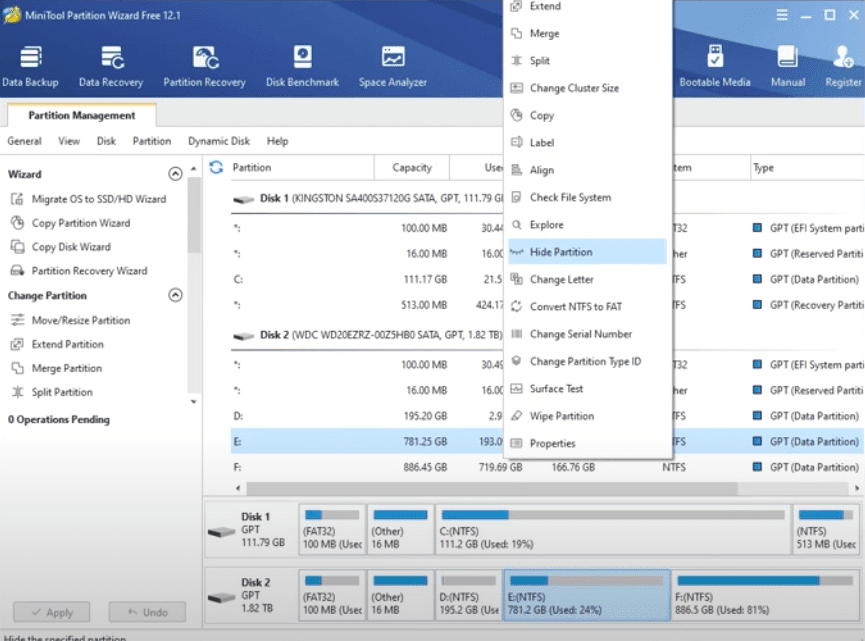
- The Free edition will frustrate you if your task is "make my C: drive bigger" — that's the Pro paywall, deliberately. Free covers structural basics only.
- It's Windows-only; no macOS or Linux versions.
- Raid arrays and dynamic disks have partial support — check the edition comparison before buying for a server.
- As with any partition tool, operations on failing disks can finish the job of killing them — run the surface test first if the drive has been clicking.
Pros and cons
| Pros | Cons |
|---|---|
| Cleanest interface in the category | Resize/move (the main event) is paywalled |
| Queued, reboot-safe system partition edits | Pro tier is annual, not perpetual |
| Reliable OS migration on Pro Ultimate | No macOS/Linux |
| Useful free extras (space analyzer, surface test) | Business tiers climb fast |
Who it's for

- Free edition: students, secondary PCs, and anyone who needs format/create/wipe plus the excellent space analyzer. A solid Windows utility, zero cost.
- Pro ($59/year): the right tier for the classic "my C: drive is full" problem and MBR/GPT prep. If you'd pay a technician an hour's fee to fix a partition layout, the maths works.
- Pro Ultimate ($159 perpetual): for people who tinker — SSD upgrades, drive swaps, multiple machines over the years. The perpetual licence makes it the value pick long-term.
How it compares in 2026
AOMEI Partition Assistant undercuts on price with similar free-tier limits; EaseUS Partition Master bundles more backup features behind a busier interface. MiniTool's edge is focus: it does partition management with the least friction and the clearest UI of the three. If you want an all-in-one backup suite, look elsewhere; if you want partition surgery done calmly, this is the one I keep installed.

The verdict
4/5. MiniTool Partition Wizard is the partition manager I recommend when someone needs one done right the first time — the interface lowers the stakes of an inherently risky job, and the paid tiers' operations have been reliable for me across dozens of drives. It loses a point for paywalling the single most-needed feature (system partition resize) and the annual Pro pricing; if MiniTool made Pro perpetual at $79, this would be a 4.5.
Frequently asked questions
Is MiniTool Partition Wizard free?
There's a genuinely useful Free edition: create, delete, format and wipe partitions, align partitions, analyse disk space, and run surface tests. The features most searchers want — resizing or moving partitions including the system drive, extending, splitting/merging, and MBR↔GPT conversion — require the Pro tier at about $59/year, with OS migration and cloning in Pro Ultimate (~$159 perpetual, often discounted from $199).
Is MiniTool Partition Wizard safe to use?
In my experience, yes for healthy disks: operations queue up, apply cleanly, and the tool warns before reboot-required changes on system partitions. The honest caveat is universal to partition software — any resize/move on a drive with existing disk problems carries risk, so run the included surface test first and back up anything you can't afford to lose before starting.
Can MiniTool Partition Wizard move unallocated space?
Yes — moving/reshuffling unallocated space so it sits adjacent to the partition you want to extend is exactly what the Pro tier's Move/Resize does, and it's the main reason Windows users buy it (Disk Management can only extend into directly-adjacent unallocated space). The operations queue and apply on reboot when the system partition is involved.
Does MiniTool Partition Wizard work on Windows 11?
Yes — the current version fully supports Windows 11 (and Windows 10), including operations on the system drive with the reboot-based apply mechanism. I tested the current build on a Windows 11 machine for this review. Business/Server editions exist for Windows Server environments.
What's better: MiniTool Partition Wizard or AOMEI Partition Assistant?
They're close: both offer free basics and paid resize/move/migrate. MiniTool has the cleaner, calmer interface and (for me) the more reliable migration wizard; AOMEI often undercuts on price and bundles more extras. Choose MiniTool if UI clarity matters most or you find it discounted — the outcome of the core operations is equivalent on healthy drives.
Related reading
- How to remove duplicate files in Windows
- Free software to clean unnecessary files on Windows
- Tips to speed up WordPress website performance
I keep Partition Wizard Pro Ultimate installed on my workshop PC and reach for it several times a month — if you're stuck on a specific partition layout problem, describe it in the comments and I'll tell you whether this tool (or plain Disk Management) is the right fix.