Core Ultra 5 or Ryzen AI 7? Snapdragon X2 or Apple M5? Since this guide was first written, every CPU maker has renamed its lineup — Intel dropped the "i" from Core i5, AMD bolted "AI" onto Ryzen, and Qualcomm shipped the fastest Windows laptops most people have ever owned. The good news: underneath the new names, choosing a laptop processor is still the same four-step decision, and this guide walks you through it with the 2026 lineup decoded.
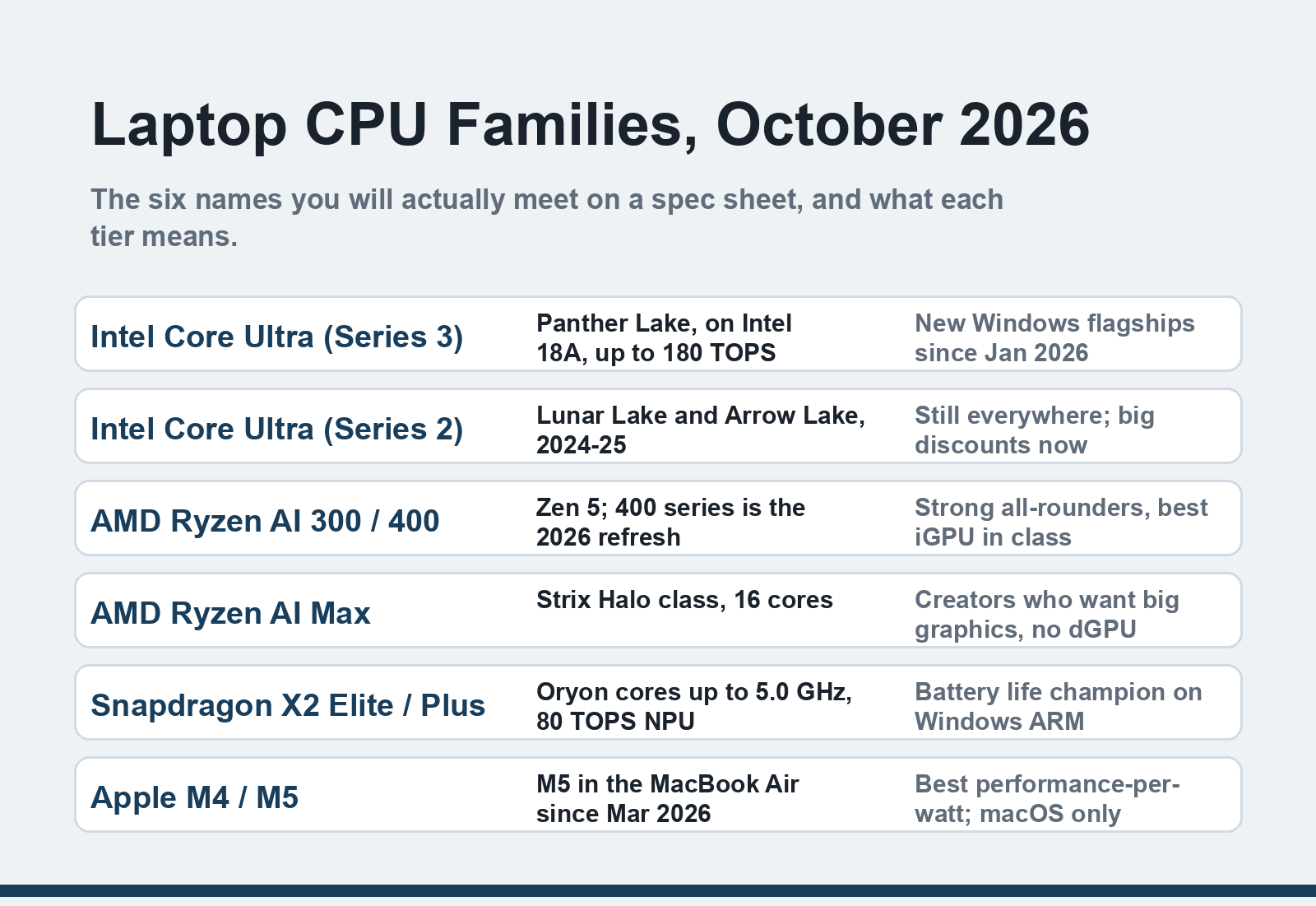
Quick answer: Pick the tier before the brand — Intel Core Ultra 5 / AMD Ryzen 5 / Apple M5 handles browsing and office work, Core Ultra 7 / Ryzen 7 / Snapdragon X2 Plus suits creative work and heavy multitasking, and Core Ultra 9 / Ryzen 9 / X2 Elite is for video editing and gaming laptops. Then buy the newest generation your budget allows: a recent mid-tier chip beats an old flagship.
What changed since the original 2022 guide
| 2022 name | What it's called in 2026 |
|---|---|
| Intel Core i3/i5/i7 (Alder Lake) | Intel Core Ultra 5/7/9 — Series 3 "Panther Lake" launched January 2026 on Intel 18A |
| AMD Ryzen 6000 (Rembrandt) | AMD Ryzen AI 300, refreshed at CES 2026 as Ryzen AI 400 ("Gorgon Point") |
| Apple M1 | Apple M5, in the MacBook Air since March 2026 |
| (Windows on ARM: near-dead) | Snapdragon X2 Elite / Plus — the battery-life champions of 2026 |
| "Base Power" TDP talk | Same idea, still printed on Intel spec sheets |
Lineups and dates checked against Intel, AMD, Qualcomm and Apple's own pages, October 2026.
What you need
- The laptops you're considering, with their full spec sheets (model numbers, not just "Intel Core 7")
- A rough workload description — what you actually do on a laptop day to day
- A budget ceiling that includes RAM and storage, not just the chip
The steps
1. Start with your workload, not the wattage
The processor is the heart of the laptop — it handles everything from mouse clicks to video encoding — but the right chip depends entirely on what you ask of it. Write down your real week: if it's browser tabs, streaming, documents and calls, a mid-tier chip in any 2024-or-newer line is plenty, and you should spend the savings on RAM instead. Video editing, code compilation, large spreadsheets with thousands of rows, or modern gaming is where upper tiers earn their price. Most overspending happens at this step: people buy a 9-tier chip for email and then run out of memory anyway.
2. Choose your architecture first
Every laptop CPU today is one of three things: an x86 chip (Intel or AMD), an ARM chip (Qualcomm's Snapdragon, or Apple's M-series in macOS), or something exotic. Apple users have the simplest choice — every current MacBook runs the M-series, and the M5 MacBook Air (March 2026, from $999) is the default answer for macOS buyers. On Windows, ARM finally matters in 2026: Snapdragon X2 Elite machines lead the market on battery life, and Microsoft's Prism translation layer now runs most x86 apps acceptably well. The remaining exceptions are real, though — games with anti-cheat drivers, some peripherals, and niche professional apps still fail on ARM — so if your must-have software list includes those, stay on x86. ChromeOS users: recent Chromebooks use both Intel and ARM chips, and the same logic applies.
3. Decode the 2026 naming schemes
Intel's current flagships are Core Ultra Series 3 — "Panther Lake," launched January 2026 on the new 18A process, with up to 180 TOPS of AI throughput; Series 2 (Lunar Lake, Arrow Lake) laptops are still widely on sale at solid discounts and remain perfectly good buys. AMD's stack is Ryzen AI 300, with the 2026-refreshed Ryzen AI 400 series above it, plus Ryzen AI Max chips for creator machines that skip a discrete GPU. Qualcomm splits into X2 Elite, X2 Elite Extreme (the fastest Windows-on-ARM chip right now) and the newer X2 Plus for mid-rangers. When you read a spec sheet, the two numbers that matter most are the generation and the tier — a Series 2 Core Ultra 7 beats a Series 3 Core Ultra 5 for heavy work, but newer generations bring better battery efficiency and stronger AI hardware.
4. Count cores and threads sensibly
Every laptop CPU on shelves today has at least four cores; dual-core machines are gone. What changed since 2022 is that hybrid designs settled in: Intel mixes performance and efficiency cores, ARM chips like Snapdragon and Apple silicon separate them even more aggressively. Don't add them up naively — a 12-core chip with eight efficiency cores won't out-muscle an 8-core all-performance rival in bursty desktop work. As a floor: 8 CPU cores for a laptop you'll keep four years, 12+ for heavy media work. Thread counts matter less than they used to; every chip you'll encounter already multithreads.
5. Read clock speeds correctly
Gigahertz still measures how many operations a core executes per second, but advertised numbers are boost clocks — the speed one or two cores hit briefly, not the speed all cores sustain. Comparing two chips by peak GHz is how people end up with a hot laptop that feels slow. Within one family and generation, higher boost roughly means faster; across families it means little. If a spec sheet lists only a base clock (common on budget Intel N-series), expect exactly that: modest sustained performance in a cheap chassis.
6. Match the power rating to the chassis
Thermal design power (TDP) — Intel prints a "base power" number that works the same way — tells you how much heat the chip dumps, which tells you how big a cooling system the laptop needs. Most mainstream laptop CPUs sit between 15 and 28 watts; thin ultrabooks run 15W-class chips with fans that barely spin, while gaming and workstation machines run 45W+ chips that need serious heat pipes. This is where laptops differ from desktops: the same chip performs differently in a thin chassis than in a thick one, because thin ones throttle boost clocks sooner. If a laptop reviewer mentions sustained throttling, believe them over the spec sheet. Our guide to fixing an overheating MacBook shows what happens when cooling design and chip power don't match.
7. Check the NPU if you care about AI features
Every 2025-26 generation ships a neural processing unit (NPU) for on-device AI. Microsoft's Copilot+ label requires 40+ TOPS, which the Snapdragon X line, AMD's Ryzen AI 300/400 and Intel's Lunar Lake and newer all clear; older or lower-tier chips don't. Whether that matters is honest-to-goodness personal: today's NPUs speed up webcam framing, live captions, local image generation and similar features. If you don't use those, don't pay a premium for TOPS — buy the chip for its CPU and GPU.
8. Sanity-check the rest of the laptop before paying for the chip
A great processor in a badly specced laptop is the most common regret in this price bracket. Check RAM first — 16GB is the 2026 floor for Windows, 24-32GB for creative work — then storage speed and battery size. Our rundown of the best SSD laptops shows how much difference storage still makes to how fast a machine feels. And if the budget fights back, a last-generation CPU in a refurbished laptop is a better buy than this year's chip starved of RAM — refurbs have become a genuine category rather than a compromise. If the laptop's job includes live streaming, the CPU shares encoding work with the network path too — our streaming lag fixes cover the other half of that equation. For gaming laptops, the CPU pairs with a discrete Nvidia GeForce or Radeon GPU, and the same tier logic applies.
FAQ
Which is better for a laptop, Intel or AMD?
In 2026 neither wins outright. Intel's Core Ultra Series 3 leads on new-platform features and is everywhere in retail; AMD's Ryzen AI 300/400 chips are competitive or better on sustained multi-core work and integrated graphics, and often cheaper in the mid tier. Pick the specific laptop, not the brand: at the same price, compare the generation, tier and battery tests of the whole machine rather than the logo on the chip.
Is a higher GHz always a faster laptop?
No. The advertised GHz is a boost clock that a couple of cores hit briefly under ideal cooling. Sustained performance depends on core count, architecture, and how well the chassis sheds heat — a 5.0 GHz claim on a thin-and-light means far less than the same number on a gaming laptop. Within the same family and generation, higher clocks still roughly mean faster; across brands, ignore the number.
Do I need an "AI PC" with an NPU in 2026?
Only if you'll use on-device AI features. Windows Copilot+ features require 40+ TOPS, which current Snapdragon, Ryzen AI 300/400 and recent Intel chips deliver; NPUs also improve webcam framing, live captions and local photo tools. If you don't use those, an NPU costs you nothing extra on a new laptop but shouldn't drive the purchase — CPU, GPU, RAM and battery still decide how the machine feels.
Can I upgrade a laptop processor later?
No — modern laptop CPUs are soldered to the motherboard, so the chip you buy is the chip you keep. That's why this guide says buy one tier above your current workload if you expect needs to grow. The upgradeable parts on most laptops are RAM (sometimes) and the SSD (usually); treat everything else as final at purchase.
How long will a laptop CPU feel fast?
A 2026 mid-tier chip (Core Ultra 5, Ryzen 5, M5) should feel fine for mainstream work for five to six years, given 16GB+ of RAM. Upper tiers buy you headroom for heavier software, not speed you'll notice in a browser. The practical rule: buy for the software you'll run in year four, not the benchmarks in week one.
That's the whole decision: workload, architecture, generation, then the chassis around the chip — in that order, every name on the shelf decodes into a simple choice.