Quick answer
For smooth online gaming, choose a server (or host) by latency first, then hardware: single-core CPU speed and RAM matter more than headline bandwidth. Pick a provider within your region, confirm the control panel offers console and scheduled backups, and test with a monthly plan before committing to a year.
"Best server" means different things depending on what you play. If you join community servers for Minecraft, ARK or Rust, you are evaluating someone else's hosting; directories like Top Minecraft Servers list candidates, and the same factors below tell you how to judge them. If you rent or run the server yourself for friends, you are the one making the infrastructure choices. This guide covers the factors that decide your experience in both cases, updated for 2026, plus what each hosting option costs and where each falls short.
The advice below was compiled from hosting provider documentation, server-admin community consensus, and a year of running a small Minecraft server for a group of friends, October 2026.
The 6 factors, ranked by how much they hurt when wrong
| # | Factor | What good looks like | What bad looks like |
|---|---|---|---|
| 1 | Latency | Ping under 50 ms to the server | 150+ ms rubber-banding and delayed hits |
| 2 | Hardware | Fast single-core CPU, enough RAM, NVMe storage | Shared cores, no RAM headroom, HDDs |
| 3 | Player load (slot overselling) | Host caps players per node honestly | "Unlimited slots" on a crowded box |
| 4 | Control panel | One-click console, file access, mod manager | Bare FTP and a support ticket for every restart |
| 5 | Backups | Scheduled, one-click restore | Manual, or none at all |
| 6 | Support | 24/7 with real response times | Ticket black holes at the moment your server dies |
1. Latency: the factor you feel every second
Latency is the round-trip time for your inputs to reach the server and the world state to come back. Physics sets the floor: distance and the route your packets take matter more than raw bandwidth, which is why a 500 Mbps connection in one country can feel worse than a 50 Mbps one nearer the server. If you want the networking fundamentals, TechTarget's bandwidth explainer covers what the numbers actually measure.
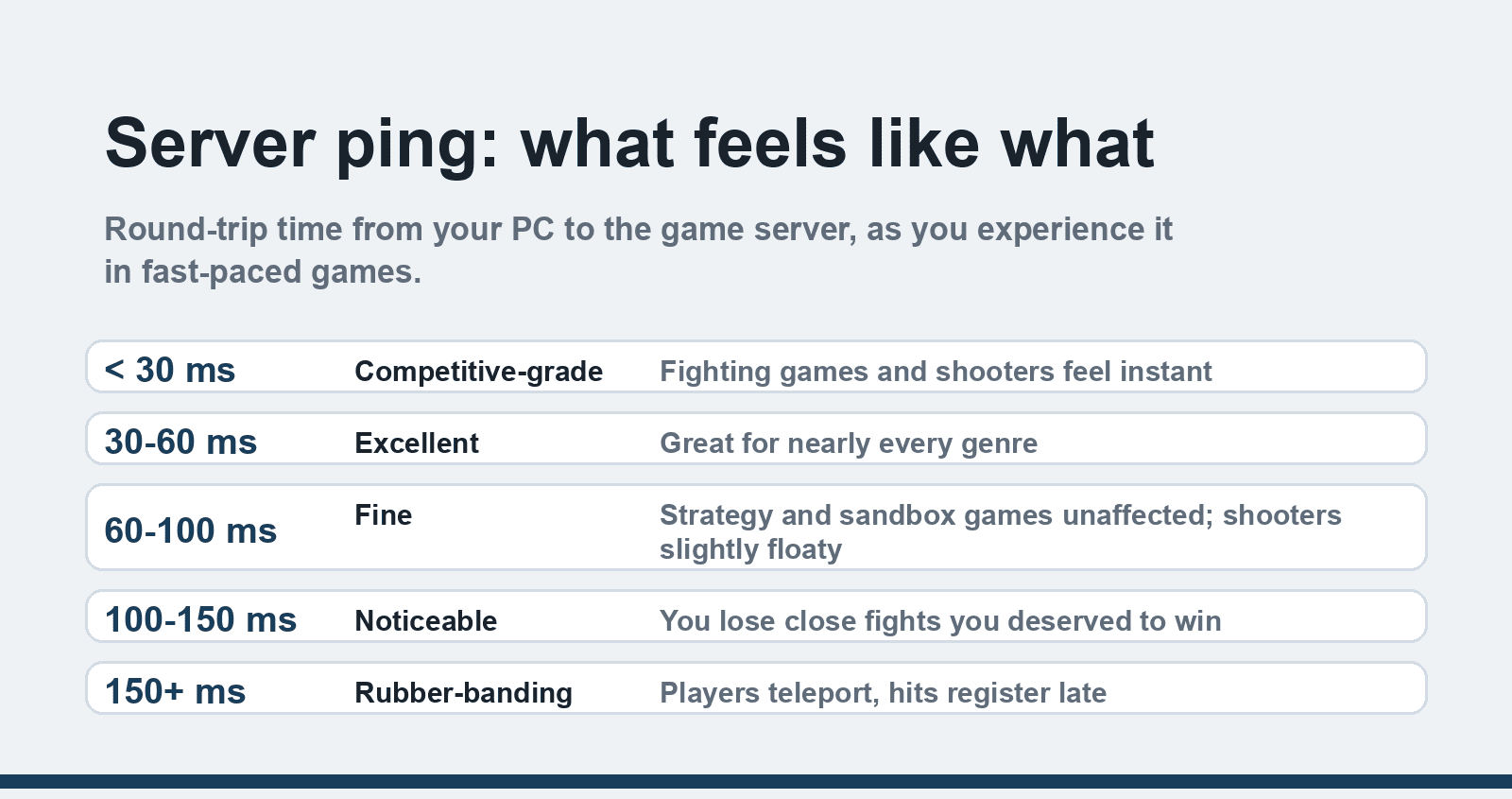
Rough ping quality for fast-paced games:
- Under 30 ms: competitive-grade; fighting games and shooters feel instant.
- 30-60 ms: excellent for almost everything.
- 60-100 ms: fine for Minecraft, RPGs and strategy; noticeable in shooters.
- 100-150 ms: playable, but you will lose close-quarters fights you deserved to win.
- Over 150 ms: rubber-banding, teleporting players, delayed registration.
Two practical moves: pick a host with a region near your players (many providers publish looking-glass or test IPs — ping them before buying), and keep your own home connection out of the way with wired ethernet where possible. Our guides to getting the best internet speed for gaming and fixing stuttering when FPS is already high cover the client side, which is a different problem from server-side lag.
2. Hardware: what actually runs the game
Game servers lean hard on single-core CPU performance. Minecraft, in particular, is largely single-threaded, so a provider's "32 cores shared" marketing matters less than the clock speed your one busy core gets. Current server CPUs from AMD and Intel both clock high enough that generation matters less than whether the host oversells them.
RAM needs by game, roughly, for a small friend group:
- Minecraft vanilla: 2-4 GB; heavily modded packs: 6-10 GB.
- Valheim or Terraria: 2-4 GB.
- ARK or Rust: 8-16 GB depending on map size and mods.
- Sandbox survival hits with big mod ecosystems: budget 16-32 GB.
Storage should be NVMe SSD, full stop. World saves and chunk loading hammer disks, and HDD-hosted Minecraft worlds produce the classic "lag spike every time someone explores" symptom. If you also game on the machine in front of you, our guide on how much memory you need for gaming covers the client side of the RAM question.
3. Player load and overselling
Budget game hosts pack many customers onto one physical machine and bet that not everyone peaks at once. Some are honest about it with resource caps per plan; others sell "unlimited" slots on hardware that buckles at ten active players. The symptom is the same: fine at 3pm, unplayable when your whole group logs in.
The protection is informational, not technical. Read the host's stated resource allocation (dedicated RAM, CPU share), check recent reviews for "server lagged on weekends" complaints, and prefer providers that publish their node capacity policy. On community servers, the tell is different: a server advertising a thousand slots on modded Minecraft is almost certainly oversold.
4. The control panel decides your weekend
A good panel turns server administration from a hobby into a checkbox. The current standard is Pterodactyl and its forks — a clean web panel with live console, file manager, scheduled tasks and one-click mod/plugin installers. Some hosts run Multicraft (older but common) or custom panels, and a few give you SSH with nothing else, which is great for learning and terrible at 11pm when the world save corrupts.
What to check before committing: live console access (not just stop/start buttons), file manager with editing, Java or game-version switching, scheduled restarts, and whether mod management is one click or a manual FTP upload session. If a host hides its panel behind a vague demo, assume the worst.
5. Backups: the factor you only appreciate once
Nothing in gaming stings like losing a two-hundred-hour world. Server crashes, corrupt saves, bad plugin updates and griefing all happen, and the difference between a shrug and a tragedy is whether the host took a snapshot last night.
Look for scheduled automatic backups (daily at minimum), a retention window of several days so you can roll back past the bad update, and one-click restore from the panel. If you self-host, set up your own job — a nightly compressed copy of the world folder to cloud storage covers most disasters. While you are in there, our guide to the infinite lava source in Minecraft is a nice bit of insurance for resource farms, though it will not save a corrupted save file.
6. Support: test before you need it
Every host claims 24/7 support. The test is response time under fire: how fast do they answer when a node goes down, and does the answer come from a technician or a copy-paste template? Before buying a long plan, open a pre-sales ticket with a technical question — the reply quality is a preview of your worst day. Community-run servers should at least have an active Discord with admins who answer.
Rent, VPS, or home server?
| Option | Typical cost (2026) | Best for | Watch out for |
|---|---|---|---|
| Managed game hosting (Apex, Shockbyte, BisectHosting and similar) | $5-20/month per instance | Minecraft and friends-group servers; zero sysadmin | Oversold budget tiers; mod support varies |
| General VPS you configure yourself | $5-15/month | Learning server admin; unusual games; multiple light servers | You are the admin: updates, backups, security |
| Dedicated server | $50-150+/month | Large communities, 100+ concurrent players | Cost; requires real administration skill |
| Home server on spare hardware | Electricity only | Tinkering, LAN play, full control | Upload bandwidth, port forwarding, dynamic IP, noise |
For a first server, managed hosting is the sane start: the panel and backups exist on day one, and the cost of learning you outgrew it is one monthly fee. A home server is the better teacher and the cheaper ride once you know what you are doing, provided your upload link can carry the players.
FAQ
How much ping is good for gaming?
Under 60 ms is excellent and indistinguishable from local play for most people. Between 60 and 100 ms stays fine for slower-paced games. Above 100 ms shooters and fighting games feel delayed, and past 150 ms rubber-banding starts. Check the host's test IP from your own connection before buying.
Is a VPS or a managed game host better for Minecraft?
For a first server, managed hosting wins: the panel, backups, version switching and mod installers are already there, and support knows Minecraft quirks. A VPS costs similar and teaches you more, but you own every failure, from Java updates to corrupt chunk repair. Move to a VPS when you outgrow the host's limits.
Why does my Minecraft server lag even with good hardware?
Usually one of four causes: too few RAM gigabytes for the mods installed, a host overselling CPU on your node, HDD storage instead of SSD, or chunk generation as players explore new map areas. Install a performance mod like Sodium on the client and Spark on the server to identify which before spending money.
How many players can a small game server handle?
On a typical $10-15/month plan with dedicated resources, a vanilla Minecraft server comfortably handles 10-20 concurrent players, modded packs fewer, and lightweight games like Terraria many more. The honest answer depends on the host's per-node policy, which is why reviews mentioning weekend lag are worth reading before you buy.
Do I need to port-forward for a home-hosted game server?
Yes, for anything hosted at home you must forward the game's port through your router to the server machine, and your players connect to your public IP. If your ISP uses carrier-grade NAT or issues dynamic IPs, that adds friction — dynamic DNS solves the address problem, and CGNAT typically requires asking the ISP for a public IP or using a tunnel service.
What is overselling in game hosting?
It means the provider packed more customers onto a physical machine than it can serve if everyone shows up at once. You notice it as lag during peak evening hours on a budget plan. Protection: choose hosts that state dedicated resource allocations, and search reviews for the word "lag" before committing to an annual plan.