An auto clicker is one of those utilities you don't think about until the day you need it: clicking through 400 identical form fields, running a repeated test, grinding an idle game, or saving an injured wrist from another thousand clicks. I've used most of the tools below for exactly those jobs. The catch with this category is that search results are flooded with clone sites and repackaged malware, so this 2026 edition sticks to tools with official download sources, flags what each one actually does well, and includes the honest warning about using clickers in online games.
Quick Answer: OP Auto Clicker is the best free auto clicker for Windows in 2026 — tiny, portable, precise interval and repeat control, no install needed. GS Auto Clicker remains the simple classic, and Murgee's Auto Mouse Click is the pick for scripted multi-step sequences. All ten tools below are free; download only from official sites, and check a game's terms before automating it.
The 10 Best Free Auto Clickers at a Glance
| # | Tool | Click modes | Hotkey start/stop | Portable | Best for |
|---|---|---|---|---|---|
| 1 | OP Auto Clicker | Single/double, L/R, fixed or current position | Yes | Yes | Most people |
| 2 | GS Auto Clicker | Single/double at fixed point | Yes | Yes | Simple set-and-forget |
| 3 | Auto Mouse Click (Murgee) | Full action scripts | Yes | No | Multi-step sequences |
| 4 | Free Mouse Clicker | Single/double, interval | Yes | No | Dead-simple basics |
| 5 | Mouse Click Generator (Sobolsoft) | Click + drag generation | Yes | No | Batch click/drag jobs |
| 6 | Free Auto Clicker (ClickSpeedTester) | Single/double, CPS presets | Yes | Yes | Gaming-style clicking |
| 7 | FastAutoClicker | Single/double, CPS control | Yes | Yes | Lightweight speed work |
| 8 | Perfect Automation | Click + keyboard + scripts | Yes | Yes | Full workflow automation |
| 9 | Auto Click Typer | Recorded click+type macros | Yes | Yes | Form-filling loops |
| 10 | Mouse Recorder Premium | Recorded macros, playback | Yes | No | Repeating real workflows |
1. OP Auto Clicker
If you only try one tool from this list, make it OP Auto Clicker — it's the closest thing this category has to a standard. It's a sub-megabyte download that runs portable (no installation), and it nails the fundamentals: click interval down to milliseconds, chosen mouse button and click type, repeat count or click-until-stopped, and your choice of clicking at the current cursor position or a fixed screen coordinate you pick visually. Global hotkeys start and stop it from inside any application. It's free, it doesn't nag, and it just works — which is rarer in this category than it should be.
2. GS Auto Clicker
GS Auto Clicker is the veteran of the category, maintained for years by Goldensoft — the official site carries the current download. The appeal is simplicity: set an interval, press F8, and GS clicks at your cursor until you press F8 again. It adds a "click point" recorder and a click-repeat counter for slightly fancier jobs, but it's the tool you reach for when you want zero configuration. The interface looks its age; the function hasn't.
3. Auto Mouse Click by Murgee
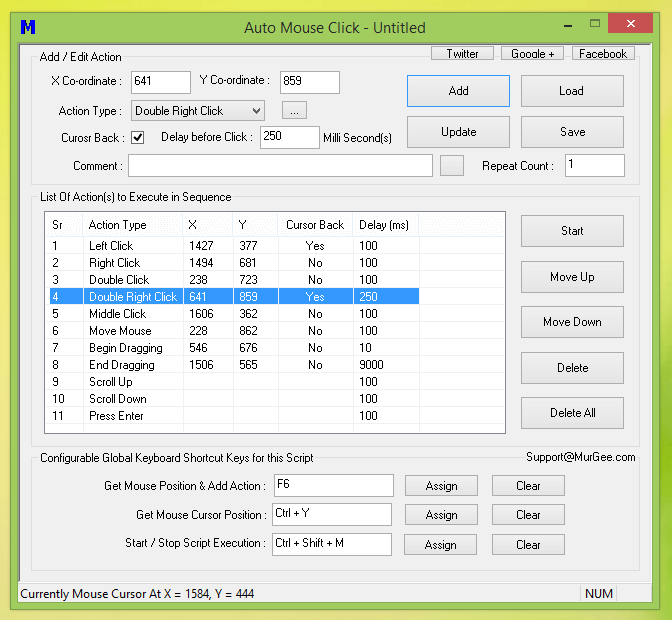
When the job is a sequence rather than repeated single clicks — click here, type that, wait, scroll, click again — Murgee's Auto Mouse Click is the right shape of tool. You build a script of actions (left/right/double clicks at coordinates, cursor moves, scrolls, key presses) with individual delays, save it as a reusable file, and trigger it with a global hotkey. The free trial's limits are the main caveat, and the dense interface takes ten minutes to learn — it's the power option here.
4. Free Mouse Clicker
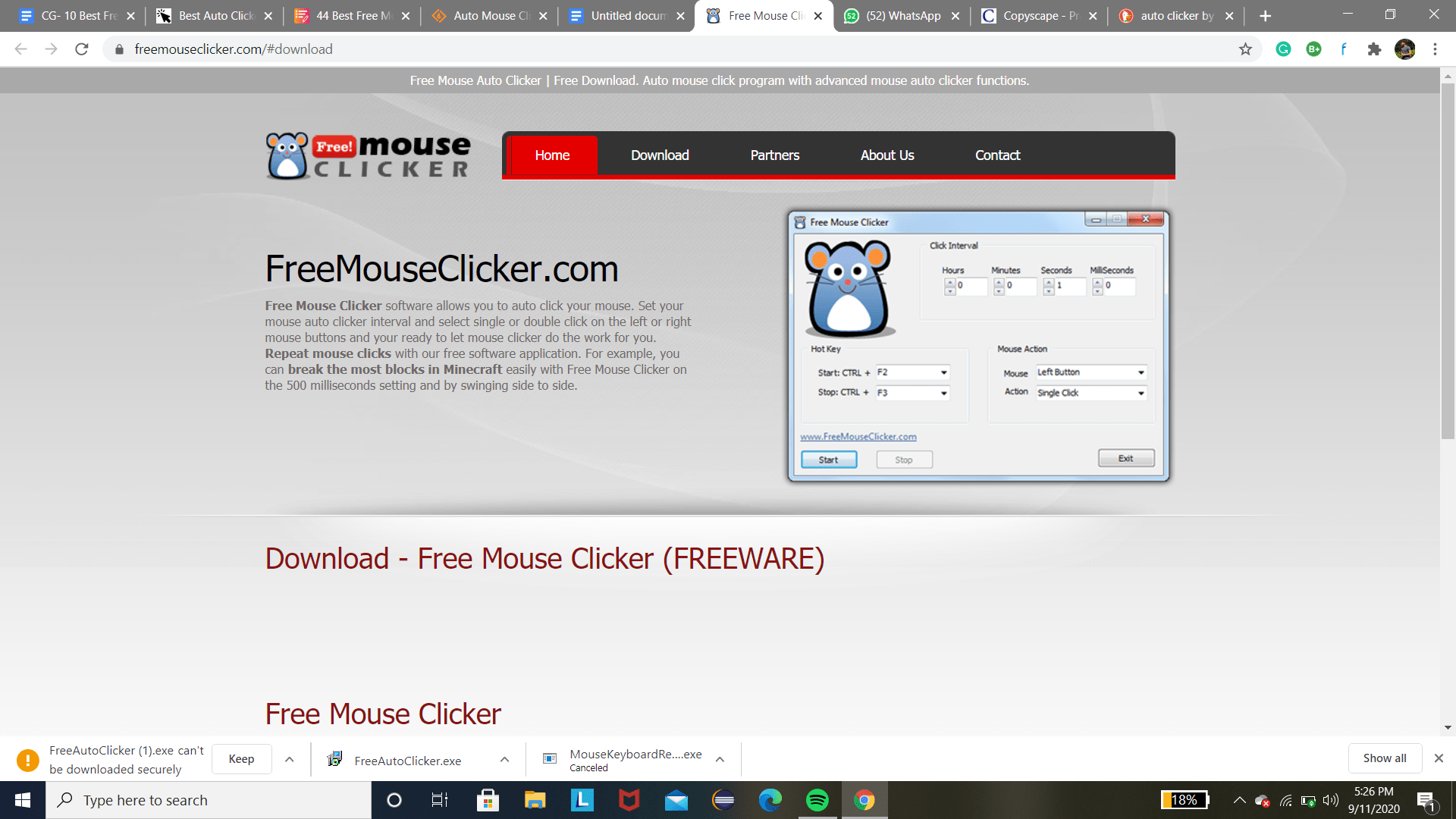
Free Mouse Clicker is the friendliest interface on this list: pick your interval in hours/minutes/seconds/milliseconds, choose left or right button and single or double click, bind start (Ctrl+F2) and stop (Ctrl+F3) hotkeys, done. There's a paid Pro tier with advanced options, but the free version covers the core job without nagging. If OP Auto Clicker looks intimidating for any reason, this is the simpler on-ramp.
5. Mouse Click Generator (Sobolsoft)
Sobolsoft's Mouse Click Generator covers the click-and-drag combination most clickers ignore: you define sequences of clicks and drags with delays between them, then trigger them on repeat. Sobolsoft distributes it as a straightforward Windows utility, and their download-and-install page walks you through setup. If your repetitive job involves dragging as well as clicking — moving files, scrubbing sliders — this is the tool shaped like your problem.
6. Free Auto Clicker (ClickSpeedTester)
The auto clicker from ClickSpeedTester is built with the gaming crowd in mind — it speaks in clicks-per-second presets and offers single or double clicking with configurable intervals, all hotkey-controlled and portable. An honest open-source alternative in the same space is the SuperClick project on SourceForge if you prefer to see what you're running.
7. FastAutoClicker
For straightforward fast automated clicking, FastAutoClicker does exactly what its name says: millisecond interval control, single or double clicks, and a lightweight footprint that runs from anywhere. It sits in the same niche as OP Auto Clicker with fewer options and a simpler screen — some people genuinely prefer that.
8. Perfect Automation
Perfect Automation is what happens when an auto clicker grows into a full automation suite: recorded macros, scheduled tasks, script editing, and keyboard automation on top of click automation. If your repetitive work involves more than clicking — typing the same paragraphs, launching programs, waiting for windows — this replaces three utilities with one. The learning curve is the price.
9. Auto Click Typer
Auto Click Typer focuses on the click-plus-typing combination: you record a sequence of mouse clicks and keystrokes, then replay it on a loop with a hotkey. It's built for exactly the tedium most people actually have — form fields, login screens, repetitive data entry — rather than gaming clicks.
10. Mouse Recorder Premium
Mouse Recorder Premium from the same developer as Perfect Automation records your real mouse and keyboard activity and plays it back, with a macro editor to clean up the recording. For "I do this same ten-minute workflow every morning," recording beats programming — you do the task once naturally, then automate it forever.
A note on MurGaa, since searches for it are common: MurGaa's clickers are a fixture of the Mac world, and the MurGaa auto clicker for Mac is their flagship product. Their Windows offerings are lighter web-based tools, which is why MurGaa sits outside the top 10 rather than in it — if you're on a Mac, start there; on Windows, the ten tools above will serve you better.
Safety Notes: Downloads, Games, and Your Wrist
Three things worth knowing that the old version of this list didn't say:
- Download only from the official sites linked above. "Auto clicker" is one of the most-repacked keywords in the adware economy — clone sites offer installers stuffed with extras. Every download in this list goes to the tool's own site or its project page.
- Games treat automation as cheating. For offline grind and idle games, an auto clicker is your business. For online games with anti-cheat — Roblox titles, competitive shooters, MMOs — input automation violates the terms and risks an account ban. That's a decision to make with eyes open, not a surprise to discover.
- They're genuinely useful beyond games: accessibility (for users who can't click comfortably), QA testing, and batch form entry are the highest-value uses of these tools — and the least talked about.
For repeating whole tasks rather than clicks, TinyTask (tinytask.net) is a beloved sub-100KB macro recorder that records and replays mouse and keyboard input in one take — a natural companion to any tool on this list.
FAQ
Are free auto clickers safe to use?
The tools on this list are, when downloaded from their official sources — the category's danger comes from clone download sites repackaging popular clickers with adware or worse. Two habits keep you safe: get the installer only from the tool's own domain, and if your browser or antivirus flags a download from anywhere else, believe it. A portable tool that runs without installation also limits what a bad installer can do.
What is the best auto clicker for gaming?
OP Auto Clicker is the community standard for Windows gaming clicks — precise CPS control, hotkeys, and no cost. But separate single-player from online honestly: automating clicks in games with anti-cheat systems violates their terms and risks bans, regardless of which clicker you use. For idle and offline games, any tool on this list does the job; for anything with an account you care about, read the game's terms first.
Can I get banned for using an auto clicker?
On offline software, there's nobody to ban you. On online platforms, the answer is written in each game's terms: many mobile and Roblox-style games explicitly prohibit input automation and do issue bans for it, and anti-cheat systems in competitive games treat synthetic input as cheating. Tools can't detect-proof you — the safe rule is to automate only where a ban wouldn't cost you anything you value.
What's the difference between an auto clicker and a macro recorder?
An auto clicker repeats a click (or a simple click pattern) automatically; a macro recorder captures whole sequences of your clicks and keystrokes and replays them. If the problem is "my finger is tired," you want a clicker (entries 1–6). If the problem is "this task takes ten steps every time," you want a recorder — Auto Click Typer, Mouse Recorder Premium, Perfect Automation, or TinyTask.
Do auto clickers work on Windows 11?
Yes — every tool on this list runs on Windows 11 as well as Windows 10, since they rely on input APIs that haven't changed between versions. Two Windows 11-specific notes: run the installer's compatibility mode only if a tool misbehaves (rare here), and remember that display scaling can shift the fixed coordinates some clickers record — pick click points with the tool's own picker rather than eyeballing pixel numbers.
Related Reading
- 4 Tricks You Can Always Rely On to Speed Up Your Operating System
- Free Software to Clean Unnecessary Files on Windows PC
- The Best Android Devices for Gaming
—
I've automated everything from data-entry marathons to cookie-clicker-style games with these tools — if you tell me the repetitive task you're fighting, I'll tell you whether a clicker or a recorder is the right weapon.