When I first reviewed SendPulse back in 2017, it was a promising budget tool for email, SMS, and web push. Nine years later, the platform has grown into a full marketing suite with chatbots, a built-in CRM, and even a website builder. This is my updated, hands-on look at whether the SMS service is still as easy and quick as the title promises — and what's changed along the way.
Short version: mostly yes. But there are a few things you should know before signing up, including one feature that is no longer free.
Quick Answer: SendPulse is a budget-friendly, multi-channel marketing platform: email, SMS, web push, chatbots, and a CRM in one dashboard. SMS is pay-as-you-go by country, with 10 free test messages and delivery to 200+ countries. Best for small businesses that want every channel without enterprise pricing. My rating: 4.3/5.
What SendPulse Is in 2026
The core idea hasn't changed: reach people on whichever channel they actually respond to. SendPulse started as an email tool, then added SMS and web push, and the multichannel logic still runs through everything. If a subscriber doesn't open your email, you can follow up with an SMS or a push notification instead of hoping they see it eventually.
The email service remains the centre of the platform. The free plan gets you a drag-and-drop builder, 140+ templates, subscription forms, basic automation, and open/click analytics. What's genuinely new since my first review: 3 chatbots, a small built-in CRM, and a website builder are included even on the free tier. For a bootstrapped business, that's a lot of tooling at zero cost.
SendPulse SMS: The Features That Matter
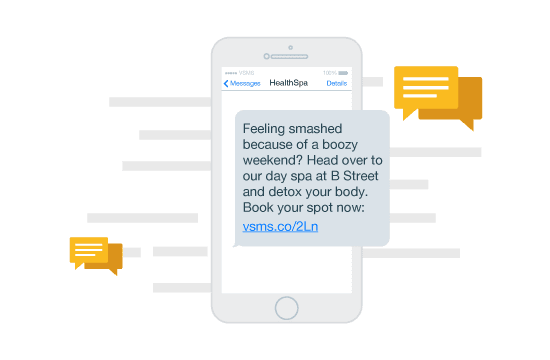
SMS is where I focused my testing, because it's the channel most email-first platforms handle badly. Here's what you get:
- Global reach with fast delivery. SendPulse currently claims coverage across 200+ countries and 1,000+ mobile carriers, with throughput of up to 500 SMS per second. That's up from the 800 networks figure in my 2017 review. The company claims 99% delivery when you follow local messaging rules — registered sender IDs, proper opt-in, that sort of thing.
- Custom sender names. Up to 11 characters or digits. Note that some mobile operators require you to register your sender ID with a confirmation form before it works, which can take extra time in certain countries.
- Scheduling and gradual sending. Write the message, upload recipients, and set a date — useful for appointment reminders, birthday offers, or flash-sale announcements. Recipient lists update automatically, so new contacts added before the send go out are included.
- Personalisation variables. Name, date of birth, gender, order number, product price, delivery date — merged into each text, the same way you'd personalise an email.
- Segmentation. Split your audience by mobile operator, country code, age, interests, or gender.
- A separate transactional route. OTPs, 2FA codes, and order confirmations go through a high-priority lane, which matters because a delayed OTP is worse than no OTP.
- Developer options. A REST API and an SMPP gateway if you want SMS triggers wired into your store, CMS, or CRM. There are also SMS chatbots with keyword-triggered flows.
- Mobile apps. Native iOS and Android apps let you fire off a campaign and check stats from your phone.
How I Tested It: Creating an SMS Campaign
Setting up a test campaign took me a few minutes, and the flow hasn't fundamentally changed since 2017 — the dashboard has been redesigned, so older screenshots (including the ones below from my original test) look dated, but the steps are the same.
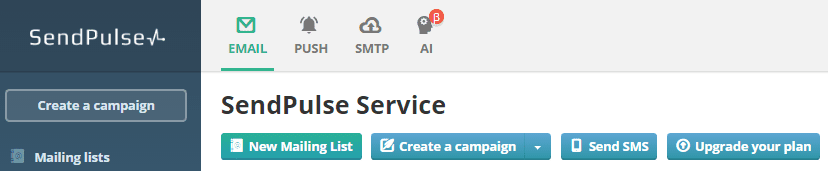
1. Click "Send SMS" from the dashboard. It sits alongside "New Mailing List" and "Create a campaign", so you don't dig through menus to find it.
2. Fill in the campaign form. You pick a sender name, write your text, and the form counts both symbols and how many SMS credits the message will cost — a 124-character message counted as exactly 1 SMS on my test. New accounts get 10 free test messages before you have to add funds.
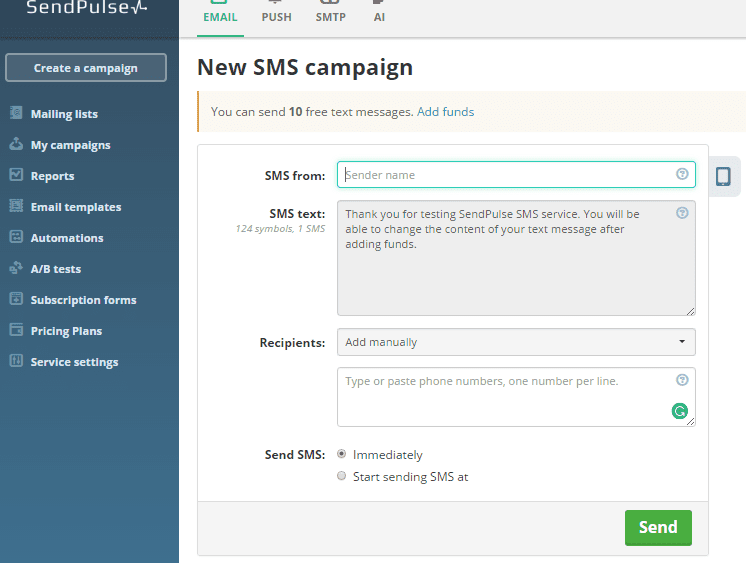
3. Add recipients. Either type or paste phone numbers into an address book (one per line), or import them from another service using that service's API key.
4. Send now or schedule. The radio buttons let you fire immediately or set a start time — I used the immediate option for the test, but the scheduler is where recurring reminders pay off.
5. Check the stats. After sending, each campaign gets its own report with delivery numbers, and any links you wrap in SendPulse's tracker get click data.
The whole thing is genuinely no-code. If you've ever sent a Mailchimp campaign, nothing here will surprise you.
SendPulse Pricing in 2026
This is where the biggest changes since my original review live, so read this bit carefully.
- Free email plan. 15,000 emails per month to up to 500 subscribers, including the builder, templates, forms, basic automation, 3 chatbots, and CRM access. Still one of the more generous free tiers around.
- Paid email plans. Start around $10/month for 500 subscribers on annual billing, with Standard, Pro, and Enterprise tiers. Check the pricing page for current numbers — monthly billing costs more, and SendPulse adjusts prices periodically.
- SMS is pay-as-you-go. You top up a balance, and each message is deducted at a per-country rate. There's no monthly SMS subscription to forget about, which I like — but it does mean costs vary by destination, so check current SMS rates for your target countries before budgeting.
- Web push is no longer free. This is the big correction to my 2017 review: free unlimited web push was one of SendPulse's headline perks back then, and the company has since moved web push to paid pricing. It's still competitively priced, but "absolutely free" no longer applies.
- Startup grant. The $5,000 startup program still exists — verified while writing this review — but read the fine print: it's $5,000 in platform credits spread over 12 months, and the credits cannot be used for SMS. Use them for email, push, or chatbots instead.
One more pricing note: SendPulse's plan builder lets you handpick only the tools you need, so you can run SMS as your only paid product.
The AI Features: Helpful, Not Magic
SendPulse's AI feature predicts the best send time for each subscriber based on their past open and click behaviour, rather than blasting everyone at 10 a.m. sharp. It also helps pick the channel. In my experience, features like this give a modest but real lift — think low single-digit percentage gains in opens, not the dramatic jumps marketing pages imply. The bigger picture is that AI is reshaping how businesses talk to customers across every channel; our piece on generative AI and customer engagement covers where this is all heading.
Pros and Cons
| Pros | Cons |
|---|---|
| Genuine multi-channel: email, SMS, web push, Viber, chatbots, and CRM in one account | SMS, web push, and Viber are paid add-ons — and web push was free when I first reviewed it |
| 10 free SMS test messages before you pay anything | Per-country SMS rates make exact campaign costs harder to predict |
| Free email plan: 15,000 emails/month to 500 subscribers | Startup grant credits can't be used on SMS |
| Pay-as-you-go SMS with no monthly lock-in | Some countries require registered sender IDs and extra paperwork before sending |
| REST API, SMPP gateway, and a priority route for OTP/transactional SMS | The dashboard has been redesigned, so older tutorials (including ours) no longer match the screen |
| $5,000 in platform credits for eligible startups |
How It Compares
| SendPulse | Typical email-only tool | Developer SMS API (Twilio-style) | |
|---|---|---|---|
| Channels | Email, SMS, web push, Viber, chatbots | Email, sometimes push | SMS and voice, via code |
| Free tier | Free email plan + 10 test SMS | Varies by vendor | None; usage-based billing |
| SMS sending | Dashboard and scheduler, no code needed | Rarely offered | Full control, but needs a developer |
| Best for | Small businesses wanting every channel in one place | Newsletter-first teams | Products with messaging built into the app |
If you only ever send newsletters, a dedicated email tool is fine. If SMS is your primary channel and you have engineers, a raw API gives more control. SendPulse wins when you want both without maintaining two vendors.
My Rating
| Category | Score |
|---|---|
| Ease of use | 4.5/5 |
| SMS features & delivery | 4/5 |
| Pricing flexibility | 4.5/5 |
| Channel breadth | 5/5 |
| Support | 4/5 |
| Overall | 4.3/5 |
Verdict: Still an Easy, Quick SMS Service
SendPulse remains a high-quality tool for small businesses. It speeds up customer communication, personalises it, and doesn't lock you into monthly fees for channels you barely use. The 2026 platform is broader than the one I reviewed in 2017 — more channels, more AI, a built-in CRM — and the pricing is still friendly, with the free email plan and 10 free test SMS giving you plenty of room to evaluate it risk-free. The two caveats: web push now costs money, and per-country SMS rates deserve a quick check before any large campaign. Neither changes my recommendation.
Frequently Asked Questions
Is SendPulse free to use?
Partially. Email has a permanent free plan — 15,000 emails a month to up to 500 subscribers, including the drag-and-drop builder, basic automation, and analytics. SMS is pay-as-you-go: you top up a balance, though new accounts get 10 free test messages. Web push, Viber, and chatbots are priced as separate add-ons on top.
How much does SendPulse SMS cost?
SendPulse charges per message, and the rate depends on the destination country — India, the US, and Europe each have different carrier fees. You add funds to your balance and each send is deducted from it. Before budgeting a campaign, check the current rates for your target countries on SendPulse's SMS pricing page, because carriers revise them regularly.
Is SendPulse good for small businesses?
Yes — that's the sweet spot. The free email tier, pay-as-you-go SMS, and modular pricing mean you only pay for channels you actually use, and the built-in CRM plus chatbots cover basics without a second subscription. Larger teams with dedicated marketing operations may find its automation depth lighter than enterprise platforms offer.
What happened to the free web push notifications?
They're gone. When I reviewed SendPulse in 2017, free web push was one of its headline perks; the service has since moved web push to paid pricing. SendPulse has said its 2026 pricing changes don't raise web push or SMS rates, but if free push was the reason you originally signed up, plan for it as a paid add-on now.
Do I need coding skills to send campaigns?
Not for regular campaigns. The dashboard handles email, SMS, and push through forms and a drag-and-drop builder — upload contacts, compose, schedule, send. Developers do get extras: a REST API, an SMPP gateway, and a separate transactional route for OTPs and confirmations, but all of that is optional. If you can write an email, you can run SendPulse.
Can I use SendPulse for SMS only, without email?
Yes. The plan builder lets you pick channels individually, so you can keep SMS as your only paid product while the free email plan sits unused. The 10 free test messages let you check delivery quality to your country before committing. Just note that the $5,000 startup grant excludes SMS if you were counting on it.
Related Reading
- The Impact of Generative AI on Customer Engagement and Marketing Performance
- Essential WooCommerce Tools to Streamline Daily Store Operations
- How Can Small Businesses Benefit from AI Technologies?
- WooCommerce vs Shopify: Which One Is Better for Long-Term Business Growth?
I've been testing SendPulse on and off since our first review in 2017 — if something in your dashboard doesn't match what I've described here, drop a comment and I'll re-test.