Most people don't think about cyber security until something goes wrong — a locked phone screen asking for ransom, a relative's WhatsApp account sending links it shouldn't, a card charge you never made. The uncomfortable truth in 2026 is that the threat economy has professionalized: phishing kits are rented by the month, scam calls use cloned voices, and the losses keep climbing. This guide breaks down why cyber security matters, what the current numbers actually say, and the habits that make a real difference.
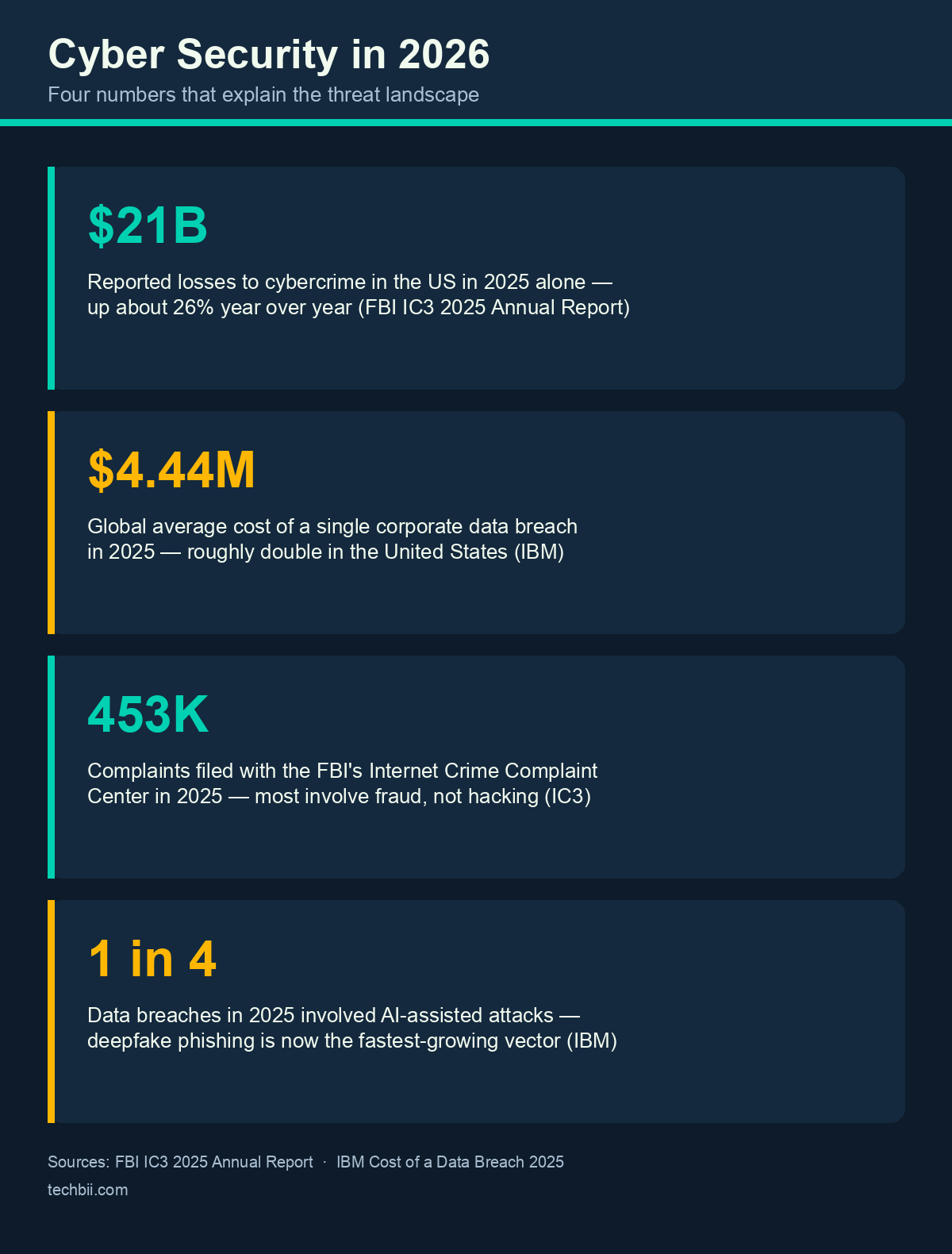
Quick Answer: Cyber security is the practice of protecting devices, accounts, data and money from online attacks — and it matters more in 2026 than ever: Americans reported roughly $21 billion in cybercrime losses in 2025 alone (FBI IC3), and the average corporate data breach now costs $4.44 million (IBM). Strong passwords, two-factor authentication, and healthy skepticism toward unsolicited messages stop most attacks.
Why Cyber Security Matters (The 2026 Numbers)
The scale is the argument. The FBI's Internet Crime Complaint Center (IC3) logged over 450,000 complaints in 2025, with reported losses of roughly $21 billion — a jump of about 26% in a single year, driven largely by investment fraud, crypto scams and AI-assisted phishing.
On the business side, IBM's Cost of a Data Breach report put the global average cost of a breach at $4.44 million in 2025 — the first decline in five years, but still ruinous for a small company. And that's the point most people miss: hackers don't only chase corporations. Small businesses are targeted precisely because they assume nobody will bother — weak email security, no backups, no staff training. For an individual, the equivalent blind spot is assuming your data isn't valuable. It is: your email, phone number and shopping history are the raw material for the scams that empty other people's accounts.
Social Media: The Free Recon Tool
Attackers rarely "hack" anyone outright anymore — they research. Public profiles hand over that research for free: family names and photos, your schedule, your location tags, the pet's name you'll later use as a password reset answer. The 2018 Cambridge Analytica scandal (NYT's original coverage here) now reads as an early warning: personal data harvested from one platform gets repurposed in ways you never consented to.
The practical version of this advice hasn't changed, only the stakes:
- Audit your privacy settings once a year — platforms reset or reword them regularly.
- Don't post travel plans or live location in public; save the beach photos for after you're home.
- Treat friend requests from unknown accounts as hostile until proven otherwise.
- Assume anything public — including your relatives' profiles — is visible to scammers building a story around you.
Passwords and Authentication: What Actually Works in 2026
Password guessing is still real, but it's automated: cracked-password lists feed tools that try billions of combinations, and reused passwords are the number-one way one breach becomes ten. Two changes since this article was first written:
- Use a password manager. Unique, random passwords for every account, memorizing exactly one. Free options like the built-in managers in iOS, Android, Chrome and Firefox cover most people's needs.
- Turn on two-factor authentication everywhere it's offered — an app-based code or a hardware key, not SMS where you have a choice. Better yet, use passkeys where sites support them in 2026: they're phishing-resistant by design and need no typing.
One correction to advice you'll still find in older articles (including, embarrassingly, earlier versions of this one): "Sign in with Google" or "Sign in with Apple" is not inherently dangerous. For low-stakes sites it's usually safer than inventing yet another weak password, because your main provider handles the login and never shares your password with the site. The real requirement is protecting that central account with a strong password and 2FA — that's where the concentration of risk lives.
Scams Are the Real Attack (And AI Made Them Better)
Ask any cyber-fraud unit what fills their case files and the answer isn't Hollywood-style hacking — it's social engineering. Package-delivery texts, fake bank OTP calls, "your account is suspended" emails, crypto-doubling schemes, and now voice-clone calls that sound like a family member in trouble.
My own favorite specimen: a few years ago I got a call from someone claiming to be customer care at a major shopping site, congratulating me on winning an expensive car. They knew my name, my order history, my address — data that had leaked from somewhere downstream. The moment I started asking verification questions they got hostile, and the call ended with them cursing me out. That's the pattern worth remembering: legitimate companies don't call you to hand out prizes, and they never need your OTP, PIN or password to do it.
The rule set is short. Never share OTPs — no real institution will ask. Hang up and call back on the official number. Be suspicious of urgency; scammers manufacture deadlines. And verify requests for money through a second channel, especially when they arrive over WhatsApp from an "urgent" relative.
Security Software: A Reality Check
The picture here has genuinely improved, and old advice is now wrong:
- Built-in protection is good now. Microsoft Defender, included with Windows 11, scores respectably in independent lab tests — something that would have been laughable a decade ago. For most people, Defender plus common sense beats a paid suite.
- Paid antivirus still has a place for users who want extra layers (banking protection, VPN bundles, parental controls), but no product catches everything. Compare current results at AV-Comparatives before paying for anything.
- HTTPS is not safety. The padlock only means the connection is encrypted — plenty of phishing sites have valid certificates. Check the address, not just the lock.
- Updates are security. Most successful attacks exploit bugs that were patched months or years earlier. Turn on automatic updates for OS, browser and phone.
CISA's Secure Our World campaign summarizes the same four habits — strong passwords, MFA, updates, and phishing awareness — which is about as close to an official consensus as this field gets.
Bottom Line
Cyber security in 2026 isn't a product you buy; it's a handful of habits. Unique passwords in a manager, two-factor or passkey logins, prompt updates, tightened social profiles, and flat refusal to share OTPs stop the overwhelming majority of attacks aimed at ordinary people. Businesses should add backups and staff awareness training to that list. You can't make yourself un-hackable — but you can make yourself annoying enough that attackers move on to easier targets.
FAQ
Why is cyber security important for ordinary people, not just companies?
Because individuals are the softest targets and the raw material for bigger crimes. Stolen email and phone numbers feed identity theft, bank-fraud social engineering and account takeovers. The FBI logged over 450,000 cybercrime complaints in 2025 with roughly $21 billion in losses, most of it from fraud against individuals and small businesses — not corporate data centers.
Is "Sign in with Google" or Facebook safe to use?
Generally yes, and often safer than creating a new weak password — your password is never shared with the site, and the provider handles the authentication. The trade-off is concentration of risk: your Google or Apple account becomes the master key, so protect it with a strong unique password and two-factor authentication. Avoid social login on sites you don't trust at all.
Are password managers actually safe?
Yes — far safer than the alternative. Reputable managers encrypt your vault so strongly that a leak of the company's data doesn't expose your passwords, and you only memorize one strong master passphrase. Reuse across sites is what actually gets accounts compromised. For most people, the manager built into their phone or browser (iCloud Keychain, Google Password Manager) is good enough.
Do I need paid antivirus software in 2026?
Usually no. Microsoft Defender on Windows 11 and the built-in protection on macOS and Android now perform well in independent tests from labs like AV-Comparatives. Paid suites add extras — VPNs, parental controls, identity monitoring — that some households want. What no antivirus fixes: reusing passwords, ignoring updates, or approving a scam popup yourself.
What is the single most effective thing I can do today?
Turn on two-factor authentication for your email account. Email is the recovery key to everything else — banking, shopping, social media — so an attacker who owns your inbox can reset all your other passwords. A free authenticator app or passkey on your primary email closes the most damaging attack path in about ten minutes.
How do I spot AI-powered phishing and deepfake scams?
Look for pressure and payment, not typos — AI has fixed the grammar problems that used to give scams away. Be suspicious of urgency, unexpected attachments, QR codes in messages, and any call that says a relative urgently needs money. Verify through a second channel: hang up, find the official number yourself, and call back. Voice cloning needs only seconds of sampled audio, so treat unusual money requests by "family" as unverified.
Related Reading
- Phishing, Deepfakes, and Compliance Gaps: The Hidden Email Threats of 2025 — where the email-borne attacks are heading.
- Top 10 Tips for Ensuring Online Privacy — tightening what the internet knows about you.
- How to Protect Your Computer From Hackers and Cyber-Attacks — the device-level hardening checklist.
- Data Privacy in the Digital Age — who collects your data and how to limit it.
Which of these habits are you already doing — and which one has been on your to-do list for a year? Tell us in the comments.