Quick Answer: Every good laptop in 2026 ships with a fast NVMe SSD, so the real decisions are capacity (512 GB is the comfortable floor), whether the drive is upgradeable, and 256 GB trap-avoidance. The MacBook Air M4 is the default pick, Framework Laptop 13 if you want to swap the SSD yourself later.
The original version of this list was written in 2021, when an SSD still distinguished a good laptop from a slow one. Five years later the SSD question has changed shape: essentially every laptop worth buying has a fast NVMe drive, and the differentiators are now capacity, upgradeability, and avoiding the fake-SSD corners budget laptops still cut. This refresh names the 2026 machines worth buying and what their storage actually gets you.
What changed since the original guide: the 2021 list starred a Surface Go with a 128 GB drive and an Intel MacBook Air. Both product lines still exist; neither config does — Intel left the Air, Microsoft moved Surface to Core Ultra chips, and 128 GB drives have all but vanished from respectable laptops.
The 2026 picks
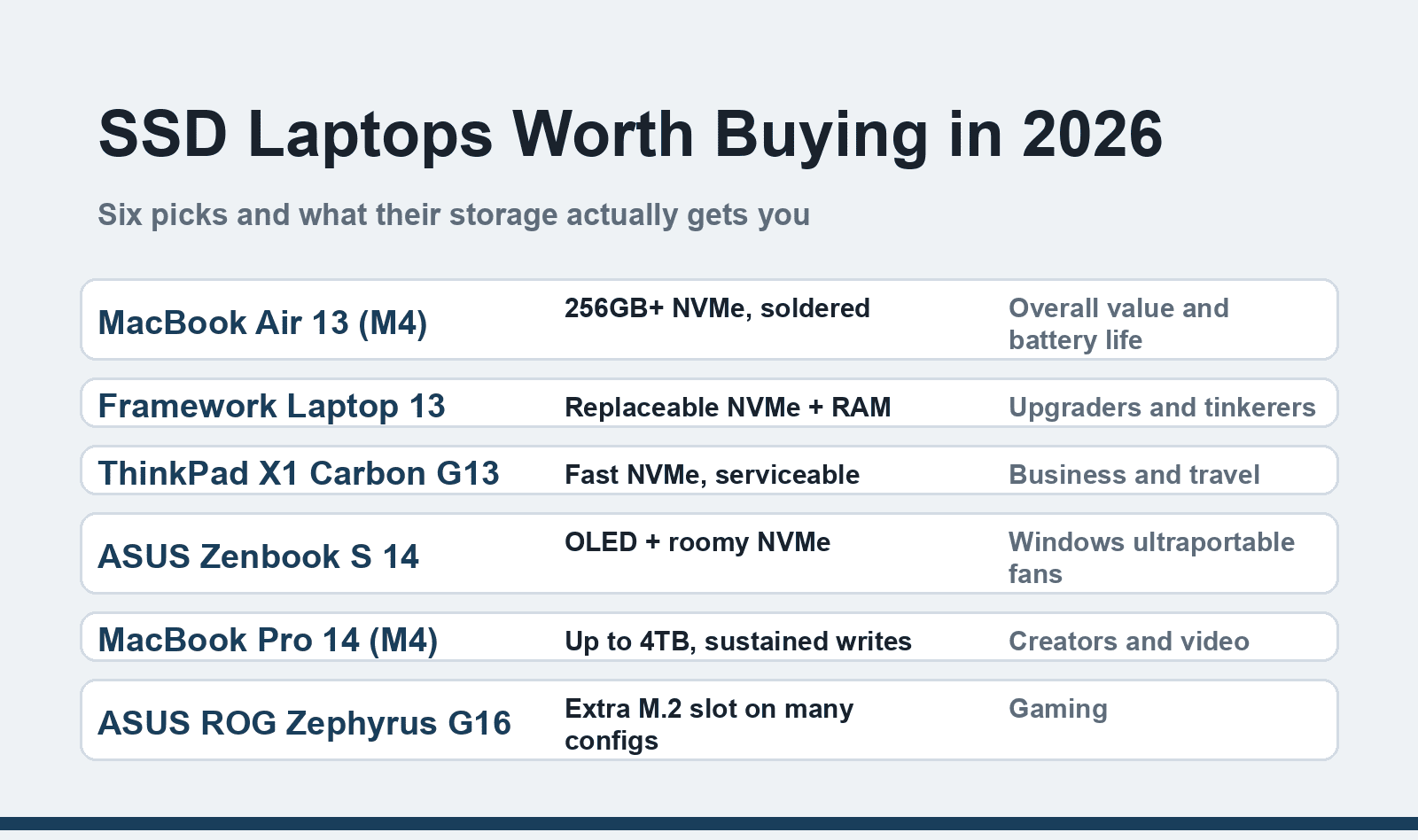
MacBook Air 13 (M4) — best overall. The default answer for most people: silent, cool, 15+ hours of real battery life, and Apple finally made 16 GB of RAM standard. The 256 GB SSD is fast but soldered — buy the capacity you need for the laptop's lifetime, because there's no upgrade path. Check Apple's current MacBook Air configurations before choosing; the 256 GB base fills fast once local AI tools and video projects move in.
Framework Laptop 13 — best for upgraders. The anti-soldered statement: the M.2 SSD, RAM, and even the mainboard swap out with a screwdriver. If your question is "can I start at 512 GB and add a 2 TB drive in three years," this is the only mainstream laptop where the answer is a clean yes. Framework bot-blocks automated checks, so verify current module pricing on their site directly.
Lenovo ThinkPad X1 Carbon (Gen 13, Aura Edition) — best business laptop. The keyboard-and-build benchmark, with a serviceable NVMe drive, business support channels, and the reliability record IT departments keep buying. Also bot-blocked from here — Lenovo's product pages exist and are worth reading, but I can't machine-verify them from this network.
ASUS Zenbook S 14 — best Windows ultraportable screen. An OLED display at ultraportable weight with a roomy NVMe drive — the pick if you read and write all day and care what text looks like. Current config on ASUS's Zenbook S 14 page.
MacBook Pro 14 (M4) — best for creators. Same silicon family as the Air with a bigger thermal envelope, sustained-write SSD options up to 4 TB, and the display to edit on. Overkill for documents; the right tool for video, large photo libraries, and local AI models.
ASUS ROG Zephyrus G16 — best gaming value. A gaming laptop that doesn't look like one, with fast NVMe storage and — unusually for slim gaming machines — a second M.2 slot on many configurations, which matters because modern games eat 100+ GB each.
What to actually check about the SSD
Capacity first, speed second. The difference between PCIe 4.0 and 5.0 drives is invisible in laptop use — boot times, app launches, and file copies feel identical. Capacity is what you'll feel in year two: 256 GB survives only as a cloud-first machine; 512 GB is the honest floor in 2026; 1 TB if you keep media local. And the new space-hungry tenant is local AI — quantized models and their caches eat tens of gigabytes without asking.
Soldered vs socketed. Ultrathin designs (all MacBooks, most Zenbooks) solder the SSD to save space; ThinkPads and Framework keep it socketed. Soldered isn't a dealbreaker — Apple's drives are excellent — but it converts a storage decision into a lifetime decision.
Watch for eMMC impostors. A handful of very cheap laptops still ship "64 GB eMMC" or "128 GB eMMC" storage. eMMC is not an SSD — it's slower flash with none of the NVMe speed, and those machines feel old on day one. Storage is also the upgrade that changes a slow laptop most; if you're troubleshooting an existing machine rather than buying, our WordPress site-speed guide covers the server side of the same principle. If a laptop's spec sheet says eMMC at a price above toy level, walk away.
External expansion is a real escape hatch. A Thunderbolt or USB4 NVMe enclosure adds fast, cheap storage to any laptop — a legitimate answer for media libraries on a soldered-512-GB machine, just not a substitute for internal capacity on your main work drive.
Quick comparison
| Pick | Storage situation | Best for | Watch out for |
|---|---|---|---|
| MacBook Air 13 (M4) | 256 GB+ soldered, very fast | Most people | No upgrade path — size it now |
| Framework Laptop 13 | Socketed, swappable | Upgraders | Pay a small premium for the philosophy |
| ThinkPad X1 Carbon G13 | Serviceable NVMe | Business | Price jumps fast with specs |
| ASUS Zenbook S 14 | Roomy NVMe, OLED | Screen-first users | OLED battery trade-off |
| MacBook Pro 14 (M4) | Up to 4 TB | Creators | Weight and price |
| ROG Zephyrus G16 | Second M.2 on many configs | Gamers | Check the specific config |
FAQ
Is 256 GB enough in 2026?
Only if you live in the cloud: documents, streaming, and phone-tethered photos fit fine. The moment you add local AI models, video projects, or a big Steam library, 256 GB becomes a storage-management chore. At the same price tier, 512 GB is the config that ages well.
Can I upgrade a laptop SSD after buying?
On a Framework, ThinkPad, and most gaming laptops — yes, usually a five-minute job with a M.2 2280 drive. On MacBooks and most consumer ultrabooks — no, the storage is soldered. Check the service manual or teardown guides for your exact model before buying, not after.
Are PCIe 4.0 vs 5.0 SSDs worth chasing in a laptop?
For almost nobody. PCIe 5.0 drives run hotter and barely change real-world laptop tasks; reviewers show single-digit differences in everyday use. Buy capacity and battery life instead — the SSD generation is the least important line on the spec sheet.
Do MacBooks handle external SSDs well?
Yes — Thunderbolt and USB4 enclosures run at full internal-drive speeds for most work, which makes a 2 TB external a sensible partner to a soldered 512 GB internal. Keep applications and working projects internal; put archives, media libraries, and backups external.
Related reading
Buy the capacity you'll need in year three, not the one that fits today's budget — storage is the spec people regret, not the one they brag about.