Quick answer
Backing up a server to the cloud keeps an offsite, versioned, recoverable copy of your data without owning storage hardware. The real benefits: ransomware resilience, fast file-level restores, pay-as-you-go cost, retention for compliance, and automation you do not have to babysit. Start with the 3-2-1-1-0 rule and a backup tool that verifies restores.
Server backups used to mean tape drives, rotation schedules, and somebody remembering to take the media offsite. Cloud backup replaced that workflow with software that copies changed data to a storage service over the internet, keeps every version you ask it to, and lets you restore a single file or an entire server from a browser.
This guide covers what you actually gain, what it costs in 2026, and the tradeoffs sales pages leave out. Pricing and storage-tier facts were checked against Backblaze's and Amazon's published pricing pages, October 2026.
The benefits, with the numbers behind them
| Benefit | What it means in practice |
|---|---|
| Ransomware resilience | Offsite copies beyond the reach of anything encrypting your network; immutability locks make backups unerasable for a set period |
| Fast granular restores | Pull one mailbox, one file, or one table in minutes instead of restoring a whole tape |
| Pay-as-you-go cost | Around $7 per TB per month for B2-class storage versus buying and powering a NAS |
| Retention and compliance | Keep daily versions for 30, 90, or 365 days without manual media management |
| Automation | Scheduled jobs with failure alerts; no human has to remember anything |
| Scalability | Storage grows with your data; no forklift hardware upgrade every few years |
1. Ransomware and disaster resilience
Ransomware does not just encrypt live files on most networks now; it hunts for backups first, because backups are the victim's leverage. A backup repository sitting on a network-attached drive in the same office is one administrator password away from being encrypted along with everything else.
Cloud backups break that chain in two ways. First, the copy is offsite and reachable only through authenticated API access. Second, major platforms support object lock (immutability), which makes backup files unerasable and unmodifiable for a retention window even if an attacker steals the credentials. When the worst day comes, you restore to clean hardware and lose hours, not weeks.
2. Restore speed where it counts
The complaint people have about cloud backup is that restoring terabytes over the internet is slow, and for a full bare-metal restore that is fair. What the complaint misses is that most restore requests are small: one deleted folder, one corrupted database file, last month's version of a contract. Those complete in minutes from a cloud copy, while a tape sitting in a safety-deposit box takes a car trip and a drive that may no longer work.
Bare-metal restores have improved too. Tools like Veeam, Acronis, and Windows Server Backup's integration with Azure can boot a server image directly from cloud storage while the full download catches up in the background.
3. The cost math in 2026
Cloud backup pricing is per terabyte per month, and the spread between providers is wide. Backblaze B2, a common choice for server backup targets, publishes $6.95/TB/month with free egress up to 3x your stored volume; Amazon S3 Standard sits near $23 per TB at list price. A 2 TB server backup on B2-class storage therefore runs about $12-14 per month, against a one-time NAS cost of several hundred dollars plus electricity, drive failures, and replacement cycles.
The honest comparison is not cloud versus nothing; it is cloud versus the hours spent administering tapes or external drives, plus the risk that the offsite copy is out of date when you need it. For most small businesses the cloud line item is cheaper than one lost afternoon.
4. Retention, versioning, and compliance
Local backup setups tend to keep a handful of versions because every version takes a drive. Cloud storage makes long retention nearly free to manage: keep 90 days of daily versions, monthly versions for seven years for tax records, whatever your policy requires, and the provider handles the media. If a client or auditor asks for a document as it existed on a specific date, you can produce it.
One caution for European users: if the backup holds personal data of EU residents, GDPR follows the data into the cloud. Choose a provider with an EU region and a data-processing agreement rather than assuming all cloud storage is equivalent.
5. Automation and the 3-2-1-1-0 rule
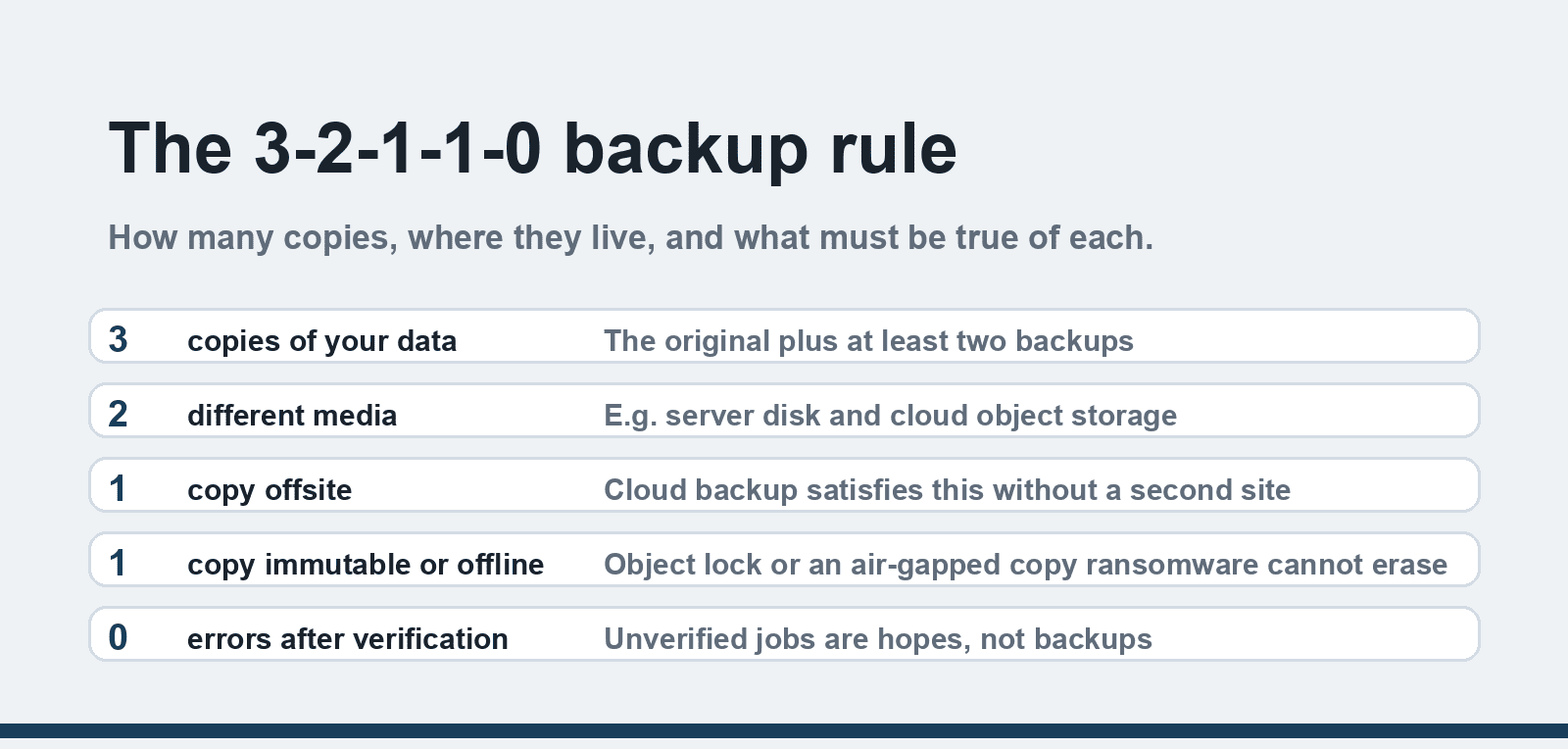
The security community's current benchmark for backup hygiene is the 3-2-1-1-0 rule: 3 copies of your data, on 2 different media, 1 copy offsite, 1 copy immutable or offline, and 0 errors after verification. Cloud backup is how most organizations satisfy the offsite and immutable legs without a second building.
Modern tools verify every backup job, checksum the data, and email or message you when a job fails. That verification leg matters more than any other: an unverified backup is a hope, not a plan.
6. Remote and distributed teams
With staff working from anywhere, the "office" is no longer a single place your data lives. Cloud backup covers laptops and branch offices the same as the central server, so a stolen laptop or a flooded shop does not mean lost work. The same job definitions run everywhere, which standardizes protection across locations without site visits.
What cloud backup does not fix
- Slow full restores on fat pipes' worth of data. If your full dataset is 5 TB and your connection uploads at 20 Mbps, the initial backup takes weeks. Ask your provider about seed loading (shipping a drive) or use a local staging copy that syncs to the cloud.
- Egress fees on the way out. Restoring large volumes from some providers costs money per GB. Check the egress policy before you commit; 3x-free-egress models like B2's avoid most of it.
- Misconfiguration. Versioning, retention, and object lock must be set deliberately. A bucket with no versioning is a sync target, not a backup.
- Cost creep without review. Storage grows with retained versions. A quarterly review of retention windows keeps the bill sane.
- Data residency obligations. Some contracts and regulations pin data to named countries. Pick regions deliberately.
For the security side of the arrangement, our guide to cloud server security covers what providers protect and what stays your job, and common cloud misconceptions clears up a few myths that still steer buying decisions.
Choosing a setup: a short checklist
1. Define your recovery point objective (how much data you can lose) and recovery time objective (how long you can be down); they determine tool and tier.
2. Pick backup software that supports your server OS and verifies jobs — Veeam, Acronis, or server-native options like Windows Server Backup to Azure.
3. Choose a storage tier matching your restore pattern: hot storage for recent versions, archive tiers for old ones.
4. Enable versioning and immutability with a retention window you can afford.
5. Run a test restore quarterly. An untested backup is Schrödinger's backup.
FAQ
How much does it cost to back up a server to the cloud?
For a small business server, expect roughly $7-25 per terabyte per month for storage depending on provider, plus backup software licensing which ranges from free to a few dollars per workload. Backblaze B2 publishes $6.95/TB/month with free egress up to 3x storage; Amazon S3 Standard lists around $23/TB. Archive tiers cut older-version costs substantially.
Is cloud backup safe from ransomware?
Safer than any local-only copy, because the offsite versions sit beyond the encrypted network and, with object lock enabled, cannot be deleted even with stolen credentials. It is not magic: an attacker with your cloud account and no immutability enabled can still destroy backups, which is why the immutable copy exists in the 3-2-1-1-0 rule.
How long does a cloud backup take?
The first backup is the long one and depends entirely on upload bandwidth; a 1 TB initial backup at 100 Mbps uploads takes roughly a day, while at 20 Mbps it takes closer to a week. After that, incremental jobs copy only changed blocks, and nightly jobs of a few GB finish in minutes to an hour.
What is the difference between cloud sync and cloud backup?
Sync services like Dropbox or OneDrive mirror your current files and replicate deletions, corruption, and ransomware encryption to the cloud. Backup keeps point-in-time versions you can roll back to, with retention you control. Many businesses need both, but only one of them protects you from yesterday's mistake.
Can I back up a server without buying backup software?
Yes, partially. Windows Server Backup can target Azure backups natively, and most storage providers expose S3-compatible APIs that free tools like Duplicati or Restic can write to. You give up polished restore interfaces and support, but for a single small server it is a legitimate starting point.
Do I still need a local backup if everything is in the cloud?
Ideally yes. A local copy restores gigabytes at LAN speed while cloud restores wait on your download link, and it protects against your own internet outage. The 3-2-1-1-0 rule wants both: local for speed, cloud for survival. If you can only fund one, make it the cloud copy, because it survives the fire.