Fingerprint Gestures was one of those apps every Android tinkerer installed in the late 2010s: it turned your fingerprint sensor into an extra row of buttons, letting you pull down the notification shade, pause music, or launch the torch with a tap or swipe. If you're searching for its APK in 2026, here's the honest status report — plus what actually works on modern Android.
Quick answer: The original Fingerprint Gestures app by SuperThomasLab is no longer on the Google Play Store, and we don't recommend hunting for its APK on random mirrors — abandoned accessibility apps are a security risk. On modern Android, use built-in options like Pixel's Quick Tap or Samsung's Good Lock modules, or try a maintained gesture app instead.
What the Fingerprint Gestures App Could Do
Released in 2016 for Android Marshmallow and above, Fingerprint Gestures let you bind actions to the sensor you already touch dozens of times a day. Single tap, double tap, and fast swipe could each trigger a different action:
- Open or toggle the notification panel and quick settings
- Play, pause, and skip music
- Launch any app or toggle the torch
- Act as Back, Home, or Recents buttons
- Put the phone to sleep or open the power menu
- Scroll in apps, toggle ringer mode, or enable split screen
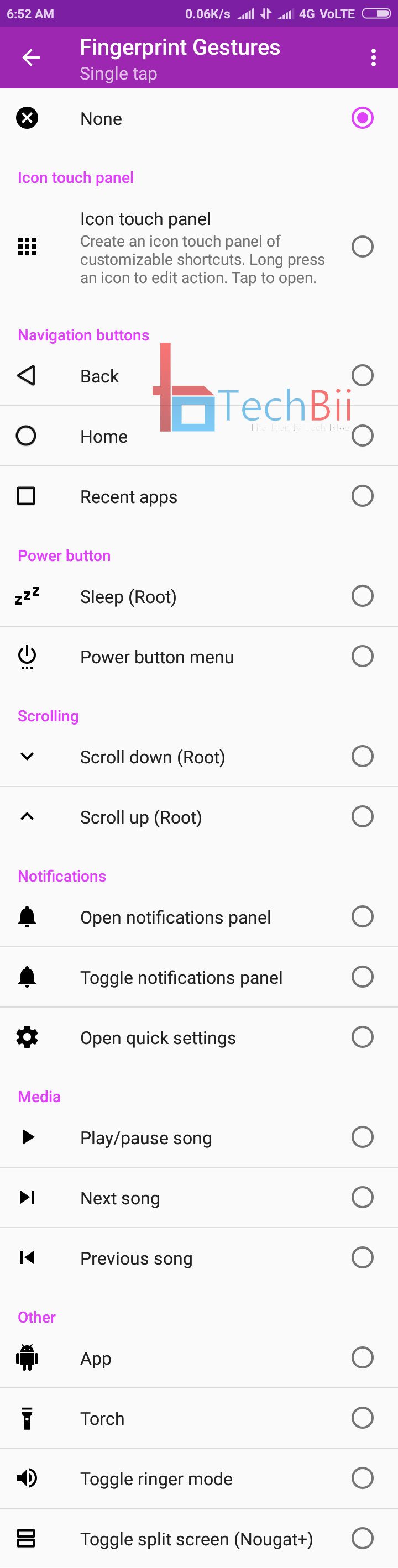
Some actions — scrolling and sleep, notably — required root; the rest worked on any device with a standard fingerprint sensor. For phones with on-screen nav bars and no extra buttons, it effectively gave you one back.
Is Fingerprint Gestures Still Available in 2026?
No. The app's Google Play listing is gone — visiting it returns a not-found page as of September 2026. The developer's page still describes the app, but updates had already become sparse years before the listing disappeared.
That's the practical reality of Android utility apps: when Google tightens what third-party apps can hook, apps built on those hooks become unmaintained and eventually delisted. Which is exactly what happened here.
If you find the Fingerprint Gestures APK on a mirror site, think twice before installing it. An app with accessibility-service permissions that no longer receives security updates is a genuine risk — accessibility access can be abused to read screens and intercept input, and sideloaded copies of abandoned apps have been re-uploaded with malware injected. Play Protect will warn you, and in this case it's right.
Why Fingerprint Gesture Apps Stopped Working Anyway
Even when the app was installed, you may have noticed it misbehaving on newer phones. That wasn't your imagination:
- Android 9 Pie began restricting how apps could observe fingerprint events, breaking the gesture hook on many devices
- Android 10 and later tightened it further, so results now depend heavily on your phone maker's software
- OEM skins complicate things — on some OnePlus/OxygenOS builds, gesture apps conflicted with the system fingerprint handler badly enough to interfere with unlocking
- Accessibility services, which such apps rely on, often fail to restart after a reboot without manual re-enabling
In short: Google has been closing the door this entire class of apps reached through, one Android version at a time.
Your Options in 2026
1. Use the built-in gesture features first
Modern Android covers much of this natively, device permitting. Pixels have Quick Tap — double-tap the back of the phone to launch the torch, open the camera, or trigger any supported shortcut. Samsung phones can remap button behavior and add gesture shortcuts through the Good Lock add-on modules and One UI settings. Nothing, OnePlus, and Xiaomi skins all ship their own gesture layers. Before installing anything, check your Settings for a gestures menu — what you're after may already be there.
2. Try a maintained gesture app
The closest currently-maintained option on the Play Store is Gesture by Dhaval Patel, which lets you draw gestures on screen to launch apps, make calls, take screenshots, and toggle settings. Be aware of the honest limitation: it replaces the fingerprint-swipe idea with drawn gestures on a floating pad, because reliable fingerprint-swipe interception isn't something modern Android permits third-party apps to do anymore.
3. Automation apps for power users
Tasker and similar automation tools can still bind a handful of actions to system events, and they're updated regularly. Setup is more involved, and reliability varies by manufacturer — but for tinkerers, that flexibility is the point.
Which Should You Pick?
If your phone is recent, start with the built-in features — they're faster, safer, and don't require accessibility permissions. Add the Gesture app if you want custom shortcuts the system doesn't offer. And whatever you do, resist the abandoned-APK route: the original Fingerprint Gestures app was great in 2016, but the version some mirror is offering today is a stale app with far more permissions than any 2026 utility should hold.
If your fingerprint sensor itself is acting up rather than your gestures, our fixes for a Redmi fingerprint sensor not working cover the common sensor problems — and if the phone has gotten sluggish overall, our guide to fixing a slow, freezing Android phone is the better stop.
FAQ
Is the Fingerprint Gestures APK safe to download in 2026?
No — we'd advise against it. The app is delisted from Google Play, which means no updates, no oversight, and no official download source. APK mirrors offering abandoned accessibility apps are a known malware vector, since such apps hold permissions that can read your screen. Nothing you'd gain from it works reliably on modern Android anyway.
Why did fingerprint gestures stop working on my phone?
Because Android progressively restricted fingerprint-event access for third-party apps. Android 9 broke many gesture hooks, Android 10 tightened the restrictions further, and manufacturer skins added their own conflicts. The feature you're remembering was always fighting the platform — and the platform won, which is why the original app is gone from the Play Store.
Does Android have built-in fingerprint gestures now?
Not swipe gestures on the sensor itself, and honestly the industry moved past them: most new phones use in-display ultrasonic or optical sensors that can't detect swipes well. Instead, Android brands offer different shortcuts — Pixel's Quick Tap (double-tap the phone's back), Samsung's Good Lock customization modules, and per-brand gesture settings. Check Settings → Gestures on your device.
What's the best fingerprint gestures app in 2026?
There isn't a true equivalent, because modern Android doesn't allow third-party apps to intercept fingerprint swipes reliably. The closest maintained alternative is the Gesture app, which uses drawn gestures on a floating panel instead of the sensor. Tasker can automate more, at the cost of a steeper setup. Built-in shortcuts cover most of what people used fingerprint gestures for.
Is sideloading APKs illegal or unsafe?
Sideloading is legal and a legitimate Android feature — but it shifts all the safety responsibility onto you. Only sideload apps from their original developers, keep Play Protect enabled, and never install a re-upload of a delisted app whose source you can't verify. Abandoned apps with accessibility permissions are the single worst category to sideload.
Related reading
- Redmi fingerprint sensor not working? Safe fixes for Xiaomi phones
- Android phone running slow and freezing? Causes and fixes
Which shortcut do you wish Android would build in natively? Tell us in the comments.