Content marketing tool lists age fast: prices move every year, companies get acquired, and since 2023 every serious tool has stapled AI features onto its core product. This list survived its own refresh — twelve tools that still earn their keep in 2026, reorganized by the job they do rather than by category name, with current pricing and an honest verdict for each. One casualty to note up front: Percolate, which appeared in the original version, was absorbed into Seismic back in 2021, so it now appears here under its new name.
Quick Answer: The best content marketing tools in 2026: Google Trends and BuzzSumo for research, Semrush for SEO, Grammarly and Hemingway for writing, Canva for design, Pexels and Shutterstock for assets, and HubSpot, CoSchedule, Uberflip and Seismic for orchestration and distribution. Most offer free tiers or trials — build the stack around your workflow, not the other way round.
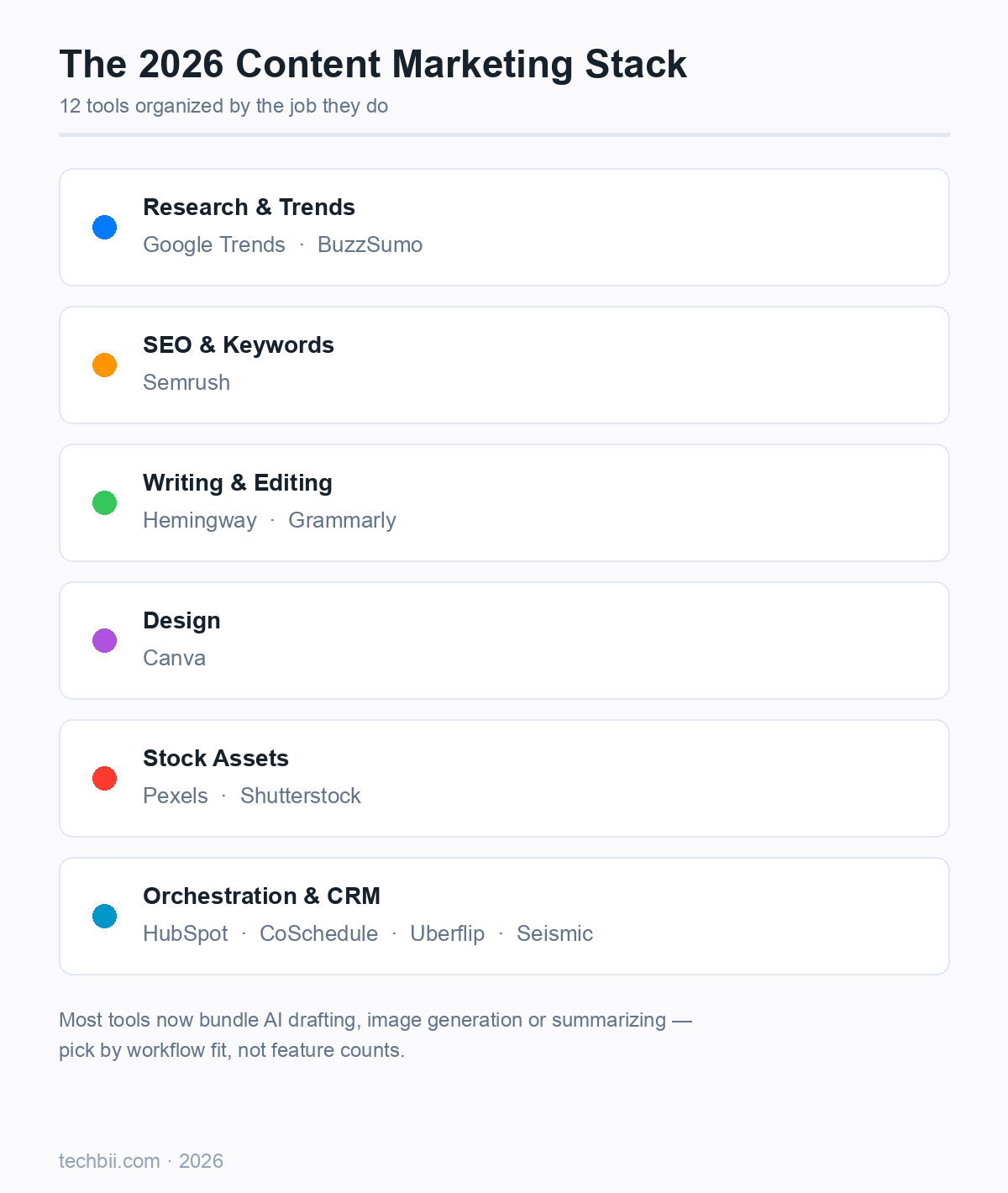
Research & Trends
1. Google Trends
Price: Free. The cheapest competitive intelligence on the internet: relative search interest over time, by region and topic, refreshed daily. In 2026 it matters more, not less, because it also captures the AI-era question shift — you can watch terms like "AI overview" or specific model names curve upward before they hit keyword tools. Pair it with keyword tools: Trends shows direction, not volume.
Best for: spotting demand shifts early and validating seasonality. Everyone should have this open in a tab.
2. BuzzSumo
Price: from $199/month (annual billing discounts it to ~$159); 7-day free trial. BuzzSumo answers "what's actually getting shared and linked?" — top-performing content by topic, journalist database for outreach, and competitor monitoring. It's the priciest item here, and the honest framing is: you're paying for research depth that free tools don't offer. Agencies and content teams get their money's worth; solo bloggers rarely do.
Best for: teams that publish consistently and need repeatable topic validation plus PR outreach in one place.
SEO & Keywords
3. Semrush
Price: Pro plan $139.95/month (less on annual billing); limited free account. Semrush (yes, it dropped the capital M in the rebrand) remains the all-rounder SEO platform: keyword research, site audits, backlink analytics, rank tracking and competitor gap analysis. Its content-marketing-specific toolkit — topic research and an SEO writing assistant that scores drafts as you type — is what earns it a place on a content list rather than an SEO one. In 2026 its AI features also surface how your brand appears in AI-generated answers, which is becoming its own reporting category.
Best for: anyone serious about organic search. The free tier is enough to start; upgrade when the limits bite.
Writing & Editing
4. Grammarly
Price: free tier; Pro ~$12/member/month billed annually ($30 monthly). Still the default grammar and clarity checker, with browser extensions and Google Docs/Word integration that make it friction-free. The 2025-era shift turned it into a broader AI writing partner — drafting, rewriting and tone adjustments — which mostly works well, though I still override half of its tone suggestions; it loves making writing sound like a corporate LinkedIn post. Use it for correctness and concision, keep your own voice for everything else.
Best for: every writer, period. The free tier alone justifies installation.
5. Hemingway
Price: free web app; desktop app $19.99 one-time. The opposite philosophy to Grammarly: no account, no AI, just a readability autopsy. It highlights long sentences, passive voice and adverb pile-ups, and assigns a grade level. Where Grammarly fixes correctness, Hemingway fixes bloviation — and in an internet flooded with AI-generated prose, tight human-readable sentences are a genuine differentiator.
Best for: the final pass before publishing. The one-time desktop price is the best value on this list.
Design
6. Canva
Price: generous free tier; Pro ~$120–144/year (30-day trial). Canva turned "design tool" into "everyone tool," and its Magic Studio AI features (image generation, background removal, one-click resizing) now cover most of what used to require Photoshop. For content marketing specifically: social posts, blog graphics, infographics, thumbnails and presentation decks from templates that no longer look templated. Brand kits keep everything consistent.
Best for: teams without a designer — which is most teams. Check current Canva Pro pricing before subscribing; it's moved more than once.
Stock Assets
7. Pexels
Price: free. Free stock photos and video under a permissive license that doesn't require attribution. Quality has held up well — modern-looking, diverse imagery that fits blog headers and social posts. For most blogs, Pexels plus Canva covers 90% of visual needs at zero cost.
Best for: everyday blog and social imagery. Start here before paying for anything.
8. Shutterstock
Price: subscriptions from around $29/month for image packs. The paid end of the market: a library measured in the hundreds of millions, including editorial imagery you legally can't get free, plus footage and music. Detailed filters (color, orientation, people, diversity) make finding the right asset fast. You're paying for breadth and licensing certainty, not aesthetics — Pexels photos often look fresher.
Best for: commercial campaigns and niches (healthcare, finance, B2B) where free libraries run thin.
Orchestration & Distribution
9. HubSpot
Price: free CRM tier; paid plans from around $20/seat/month (Starter), climbing steeply into Professional. HubSpot is the "everything platform" — email marketing, automation, landing pages, lead management, analytics — and its content hub handles the publishing-and-optimization side. The generous free CRM is the honest starting point: log contacts, send email, see what converts, and only upgrade when a specific limit forces it. The classic trap is jumping to Professional tier pricing before the revenue justifies it.
Best for: small businesses that want marketing, sales and CRM in one system rather than five subscriptions.
10. CoSchedule
Price: free editorial calendar tier; paid plans from around $19–49/month. The calendar-first marketing manager: plan campaigns, assign tasks, run social scheduling, and — its signature feature — automatically requeue evergreen social posts so old content keeps working. For a small team drowning in "who's publishing what when," a shared calendar alone is worth it.
Best for: solo marketers and small teams coordinating multiple channels.
11. Uberflip
Price: demo/quote-based (it's an enterprise tool). A content experience platform: it aggregates your blogs, videos and ebooks into a personalized "hub" with calls-to-action on every asset, used mostly by B2B demand-gen teams to move buyers through long sales cycles. It hasn't gotten cheaper or simpler since 2021 — if anything, the category has consolidated — but for account-based marketing it still does a job nothing free replicates.
Best for: B2B teams with enough content volume and sales-cycle length to justify quote pricing.
12. Seismic (formerly Percolate)
Price: quote-based enterprise. Percolate — the content-marketing platform in the original 2021 version of this list — was acquired by Seismic, and its capabilities now live inside Seismic's sales-enablement platform: content planning, workflow approvals, asset libraries and brand governance for large organizations. If you're a mid-market or enterprise marketing team wondering "where did Percolate go," it's here. Smaller teams: skip — this is enterprise workflow territory.
Best for: large organizations that need governance and approval chains across hundreds of content producers.
Building Your Stack in 2026
A sane order of operations: start with the free layer — Google Trends, Pexels, Hemingway, Grammarly's free tier, HubSpot's free CRM. Add Semrush when organic search becomes a real channel for you. Add BuzzSumo or paid Canva only when a specific repeated job demands them. And whatever you do, don't buy tools to solve a strategy problem; the enterprise orchestration platforms exist for organizations that already publish a lot and need control, not for teams looking for a publishing plan.
One 2026 note: every tool above now includes some AI feature, so "has AI" is no longer a differentiator — check whether the AI actually plugs into your workflow before paying extra for it.
FAQ
What are the best content marketing tools in 2026?
For most teams: Google Trends (free trend research), Semrush (SEO and keywords), Grammarly and Hemingway (writing and editing), Canva (design), Pexels (free stock assets), and HubSpot or CoSchedule for scheduling and lead management. BuzzSumo and enterprise platforms like Uberflip and Seismic suit larger teams. Start with the free tiers and expand only when a tool's limits actually slow you down.
Is Grammarly still worth it in 2026?
Yes — the free tier covers grammar, spelling and basic clarity, and Pro (around $12/member/month annually) adds rewriting and tone tools. It integrates everywhere you write: browser, Docs, Word, email. The caveat: treat its AI suggestions as a first draft, not gospel — its default tone skews corporate, and your voice is the thing readers actually follow.
What replaced Percolate?
Percolate was acquired by Seismic in 2021 and absorbed into Seismic's sales-enablement platform. Its content planning, workflow and asset-management capabilities now operate under the Seismic name. If you used Percolate years ago, Seismic is the direct successor; new teams should know it's quote-priced enterprise software, not a small-business tool.
How much should a small business spend on content marketing tools?
You can run a serious content operation on $0–50/month: Google Trends, Pexels, Hemingway's web app, Grammarly Free, HubSpot's free CRM and Canva's free tier cover research, visuals, writing and distribution. The first upgrade worth paying for is usually an SEO platform (Semrush at ~$140/month) once organic search matters. Tool spend should follow proven workflow, not precede it.
Are Canva and Pexels good enough for professional content?
For most purposes, yes. Canva's templates and brand kits produce consistent, professional social and blog graphics, and Pexels' free library covers standard blog imagery — both are used by professional teams daily. You need paid stock (Shutterstock) or a designer when you need editorial-licensed imagery, very specific concepts, or a distinctive visual identity that templates can't provide.
Which AI features in these tools are actually useful?
The genuinely useful ones: Canva's background removal and image generation (real time-saver for social assets), Grammarly's clarity rewrites, Semrush's SEO writing assistant scoring drafts against competitors, and HubSpot's content-assist for first drafts. The hype-to-value ratio drops for generic "AI strategy" features. Judge each by whether it removes a repetitive step you actually do weekly.
Related Reading
- 7 Best Content Writing Tips — the writing fundamentals these tools support.
- 10 SEO Strategies That Will Dominate Search Rankings in 2026 — where Semrush fits in the bigger plan.
- How Businesses Can Adapt to the Shift from SEO to GEO — optimizing for AI answers, the new frontier.
Which of these tools survived longest in your own stack — and which one did you cancel? Tell us in the comments.