A note on where the old version of this list came from: it was written by a product manager at Brush Your Ideas, who ranked their own tool first, and it counted six plugins in a title that listed seven. This rewrite keeps the genuinely useful vendors, adds the two tools that now lead the category, removes one whose site no longer loads, and judges everything by the same criteria: does it still work with current WooCommerce in 2026, and who is it actually for?
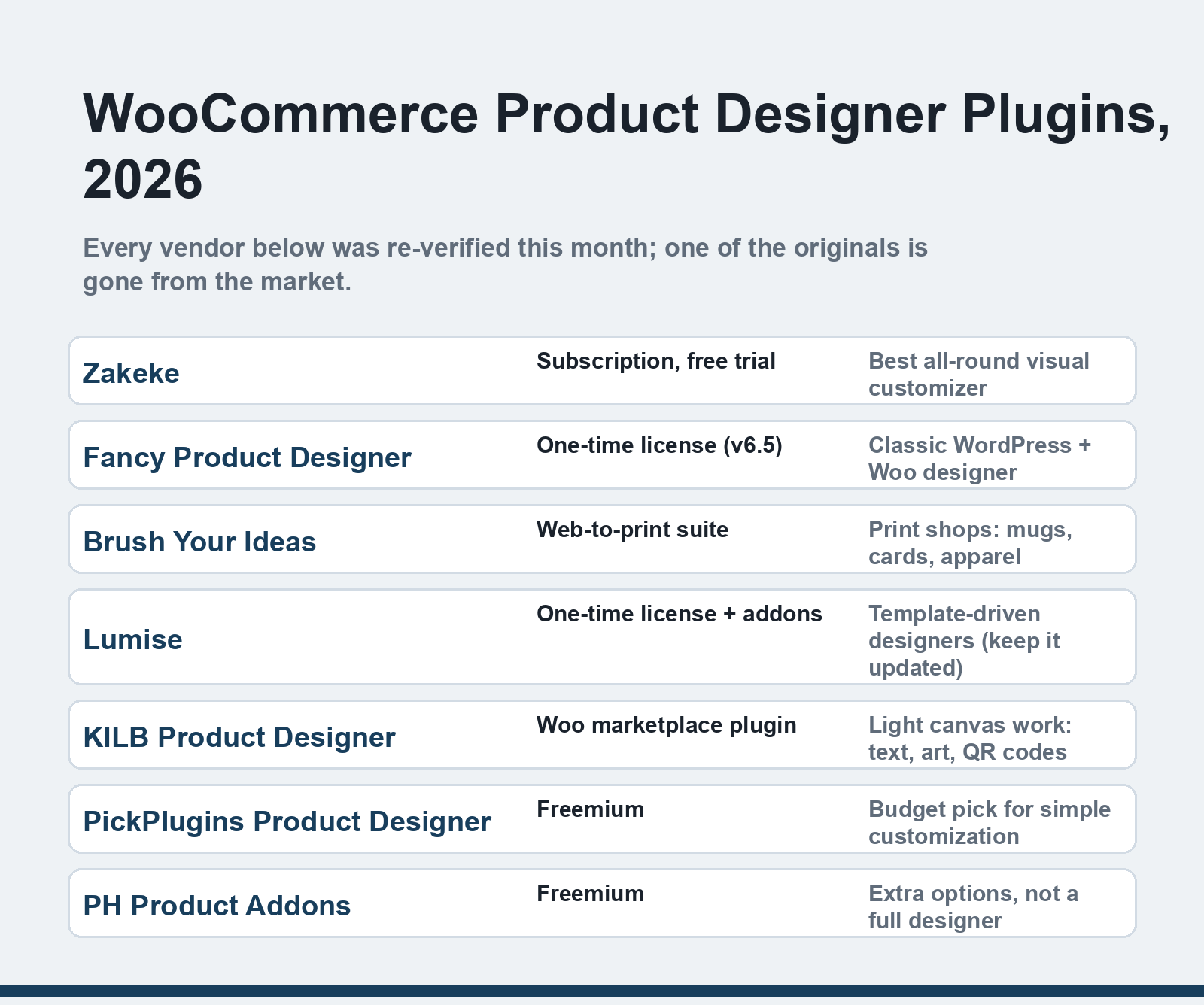
Quick answer: For most stores in 2026, Zakeke is the best product designer plugin for WooCommerce — subscription-priced, store-agnostic, with 3D previews and print-ready output. Fancy Product Designer remains the strongest one-time-license alternative, while Brush Your Ideas and Lumise suit print shops that need web-to-print workflows. Every vendor below was re-verified this month.
What changed since the original 2021 list
| Original entry | Status in 2026 |
|---|---|
| Designer Suite for WP | Gone. The site fails to connect entirely, and the plugin has dropped out of current roundups. If you still run it, plan a migration — Zakeke or Fancy Product Designer cover the same ground. |
| Design 'N' Buy | The company is alive but has moved upmarket: its flagship is now DesignO, a full web-to-print platform, rather than a simple store plugin. |
| Lumise | Alive and updated (v2.1.2), but it shipped a SQL-injection patch in 2026 — a reminder to never let this category of plugin lag behind updates, since designers handle customer-uploaded files. |
| KILB Product Designer | Still listed on the WooCommerce marketplace, now with AI-assisted design features and maintained at product-designer.io. |
Zakeke — the current benchmark
Zakeke didn't appear in the 2021 list and now tops most honest comparisons. It's a full visual customizer — 2D, 3D, and live product previews — that connects to WooCommerce, Shopify and others from one dashboard, so stores running more than one sales channel keep a single configuration layer. Pricing is a subscription with a free trial rather than a one-time license, which will annoy some store owners, but the trade is continuous updates, print-ready vector/PDF output, and staging rules (layers, print areas, color limits) that keep customer artwork actually printable. Best for: stores that want the modern default and don't mind a subscription.
Fancy Product Designer — the one-time-license classic
Fancy Product Designer has been the WordPress-native designer for a decade and is still actively developed (v6.5 shipped in December 2025). It handles layered designs, uploaded images, dynamic text, and produces print-ready files, all inside your own WordPress install rather than a third-party cloud. If you dislike per-month pricing for software you can own, this is the strongest buy-once option in the category. Best for: self-hosted stores that prefer a one-time license.
Brush Your Ideas — the web-to-print suite
The original list's sponsor is still a legitimate pick for one specific use case: web-to-print businesses. It bundles a product designer with a web-to-print storefront — clipart libraries, multi-design-area products, 360° previews, mobile-first designer UI — aimed at shops selling mugs, cards, stationery, apparel and signage. Where Zakeke and Fancy Product Designer are plugins you add to a store, Brush Your Ideas positions itself as the whole pipeline for a customization-first business. Best for: print shops where the designer is the core of the business.
Lumise — template-driven and actively maintained
Lumise is a solid canvas-based designer with pre-built templates, front-and-back design areas, and support for many product types (cards, hoodies, stickers). It's sold with optional add-ons (Printful integration, an addons bundle) and its changelog shows steady work through 2026. Two practical notes: keep it updated — that SQL-injection patch in 2026 shows why this category demands attention — and budget for the add-ons you actually need rather than the bundle. Best for: stores that want template-driven design flows with a one-time license.
KILB Product Designer — the light canvas option
KILB takes a narrower brief and executes it: let customers place text, images and QR codes on a product canvas, with JavaScript/CSS hooks for developers who want deeper customization. It's sold through the official WooCommerce marketplace, which means vetted compatibility and standard licensing — the safe choice when a full designer suite is more machinery than your catalog needs. Best for: light personalization (text, art, QR) without heavyweight features.
PickPlugins Product Designer — the budget pick
PickPlugins' designer is the freemium option: a workable free core with paid extensions, supporting image uploads, stock imagery, Google Fonts, and front-and-back designs. It won't match Zakeke's 3D previews or Fancy's polish, and its UI shows its age, but for a small store testing whether product customization moves the needle, it's the lowest-risk way to find out. Best for: testing customization demand before committing budget.
PH WooCommerce Product Addons — options, not design
The last original entry deserves its category label corrected: PluginHive's Product Addons doesn't provide a design canvas — it adds configurable options (dropdowns, text fields, pricing rules) to products. That's the right tool for "choose your engraving text" or "pick a tour date," and wrong for "let me upload my photo and drag it around." Free and premium tiers, French and English support. Best for: extra product options, not visual designing.
How to choose
Start from the print workflow, not the feature list. If output goes to a print partner, pick the tool that speaks that partner's language — Zakeke's integrations or Brush Your Ideas' web-to-print pipeline. If you sell personalization on a handful of simple products, KILB or PickPlugins covers it for a fraction of the cost. Whichever you choose, test the complete loop on a staging store first: design a product, place the order, download the print file, and confirm the output matches what your printer needs. Our reviews of the top WordPress e-commerce plugins cover the wider stack these plug into.
FAQ
What does a WooCommerce product designer plugin actually do?
It adds a design canvas to your product pages so customers can personalize items — upload photos, add text, pick colors, position artwork — and then attaches the finished design to their cart order. Behind the scenes, the better plugins also generate print-ready files (PDF/vector, CMYK) that a production team or print partner can use directly.
Zakeke or Fancy Product Designer — which should a small store pick?
If you want to own the license outright and keep everything on your own server, Fancy Product Designer's one-time model wins. If you sell across multiple channels, want 3D previews, or prefer updates arriving continuously without manual license renewals, Zakeke's subscription earns its keep. Both produce print-ready output; test the trial against your actual products before deciding.
Are free product designer plugins safe to use?
Free and freemium options (PickPlugins' core, for instance) are legitimate, but this category processes customer uploads and generates files on your server, which makes updates a security requirement, not a nicety — Lumise's 2026 SQL-injection patch is the reminder. Whatever you pick, keep it current, require HTTPS, and limit upload file types.
What happened to Designer Suite for WP?
Its website stopped responding entirely — connection attempts fail at the TLS level — and the plugin has vanished from 2026 comparison roundups. Treat it as abandoned. Stores still running it should export any template data and migrate to Zakeke, Fancy Product Designer or Lumise.
Do these plugins work with current WooCommerce in 2026?
All seven vendors profiled here are actively maintained, and the marketplace-listed KILB goes through WooCommerce's own compatibility checks. The standing caveat: WooCommerce 11 retired the product-editor beta in mid-2026, and big core changes always ripple through plugin categories like this one — confirm the vendor's changelog mentions your WooCommerce version before buying.
Pick the cheapest tool that produces files your printer accepts without rework — in this category, the workflow you can run end-to-end beats the feature list every time.