Quick Answer: Buy the 2021 24-inch M1 iMac. It is the only one of the two that runs macOS 27 Golden Gate, and used prices sit close enough that the newer machine usually costs little more. Pick the 2020 27-inch only if you need its 5K panel, the SD card slot or 64GB–128GB of RAM.
Specs in this comparison are checked against Apple's tech-spec pages for both machines and its macOS 27 compatibility list, October 2026.
In 2021 this was a new-against-new decision: the freshly redesigned M1 iMac against the 27-inch Intel model that had arrived eight months earlier, at $1,299 versus $1,799. Five years later neither machine is on sale, and the question has changed. The 2020 27-inch iMac turned out to be the last Intel iMac Apple ever built, and it has reached the end of its macOS run. The M1 iMac has not.
That one fact decides most of these comparisons today. The 5K screen, the RAM slots and the ports still matter, but only for specific jobs.
What changed since this guide was first published
| Then (June 2021) | Now (October 2026) |
|---|---|
| Both were on sale new, at $1,299 and $1,799 | Both discontinued; every unit you can buy is secondhand |
| Intel Macs and Apple silicon ran the same macOS | macOS 27 supports no Intel Mac at all |
| The M1 was an unknown quantity for app compatibility | Rosetta 2 still runs Intel-only apps in macOS 27 |
| Apple's iMac started at $1,299 | The current 24-inch M4 iMac starts at $1,499 after the June 2026 price rise |
The original article compared two new machines on launch price. That framing no longer applies. You are buying a five- or six-year-old computer, so the questions that matter are software support, what you can still upgrade, and what a clean unit actually costs.
The deciding difference: macOS 27 dropped Intel
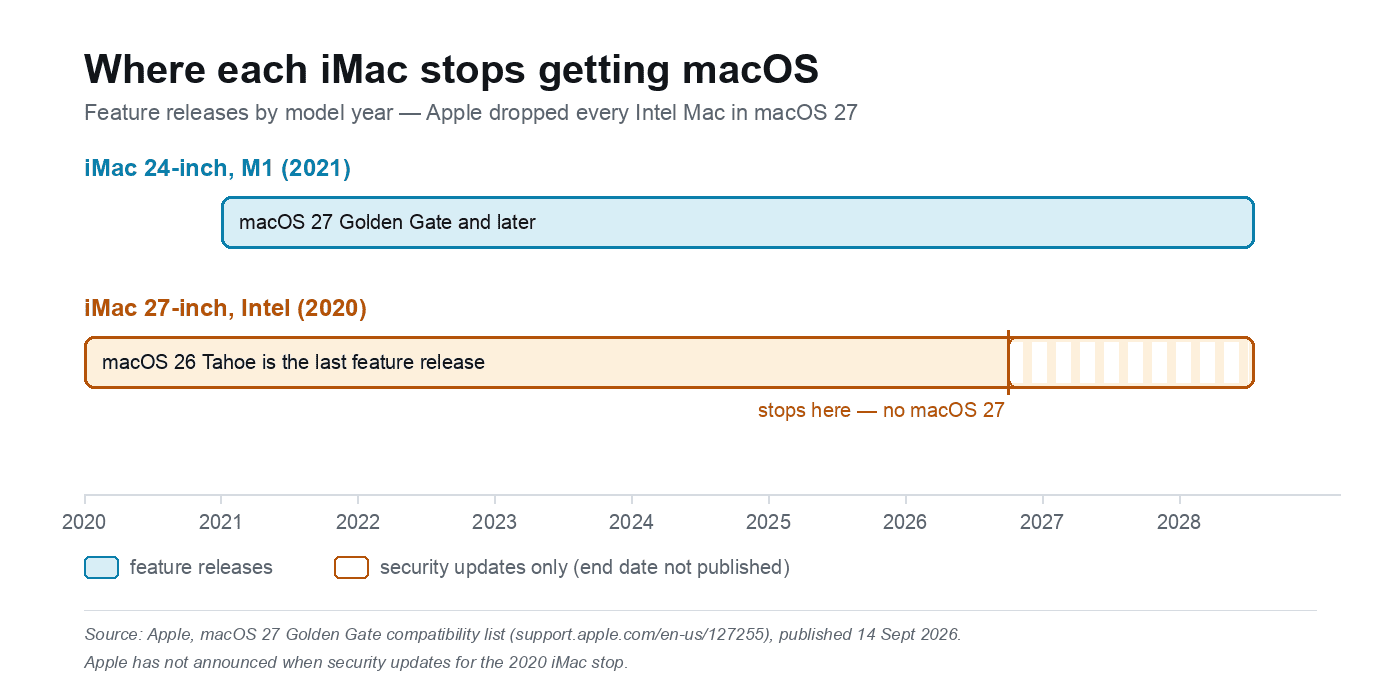
Apple's list of Macs that can install macOS 27 Golden Gate includes the iMac (24-inch, M1, 2021). It does not include the iMac (Retina 5K, 27-inch, 2020), or any other Intel Mac. The 2020 model's last feature release is macOS 26 Tahoe, which it can run today. Tahoe is the final major macOS version for Intel hardware.
In practice that means:
- Apps that require macOS 27 or later will not install, and that list only grows.
- Xcode and Apple's other developer tools move with the OS, so the 2020 machine is out for anything current.
- Safari stops at the Tahoe version. Chrome, Firefox and Office will keep supporting older macOS for a while yet, but every one of them eventually raises its minimum.
- Security patches should continue for a few more years. Apple has not published an end date, and on past form you get fixes without new features.
If this is a second machine for browsing, writing and light photo work, the 2020 iMac can still earn its place. If you plan to keep it three or more years and any of your software tracks the current macOS, it is a dead end.
Specs side by side
| iMac 24-inch (M1, 2021) | iMac 27-inch (2020, Intel) | |
|---|---|---|
| Launch price | $1,299 / $1,499 / $1,699 | $1,799 |
| Screen | 24-inch 4.5K, 4480×2520, 218 ppi | 27-inch 5K, 5120×2880, 218 ppi |
| Panel | 500 nits, P3, True Tone | 500 nits, P3, True Tone, nano-texture option |
| Chip | Apple M1, 8-core CPU, 7- or 8-core GPU | 10th-gen Intel Core i5 or i7, up to 10-core i9 |
| Graphics | Integrated M1 GPU | Radeon Pro 5300, 5500 XT, 5700 or 5700 XT |
| Memory | 8GB or 16GB unified, fixed at purchase | 8GB standard, four user-accessible slots, up to 128GB |
| Storage | 256GB to 2TB SSD, fixed at purchase | 256GB to 8TB SSD |
| Ports | 2× Thunderbolt/USB 4, up to 2× USB 3, headphone jack | 2× Thunderbolt 3, 4× USB-A, SDXC, headphone jack, Ethernet |
| Camera | 1080p with M1 image processing | 1080p |
| Audio | Six speakers with force-cancelling woofers, spatial audio | Stereo speakers, three-mic array |
| Wireless | Wi-Fi 6, Bluetooth 5.0 | Wi-Fi 5 (802.11ac), Bluetooth 5.0 |
| External displays | One, up to 6K at 60Hz | Up to two 6K (5700 or 5700 XT), otherwise one 6K or two 4K |
| Current macOS | macOS 27 Golden Gate | macOS 26 Tahoe, final feature release |
| Weight | 4.46kg (2-port) / 4.48kg (4-port) | 8.92kg |
What the spec sheet hides
Both screens are 218 pixels per inch. The 4.5K-versus-5K gap is physical size, not sharpness. A 24-inch 4.5K panel and a 27-inch 5K panel look equally crisp; the 27-inch simply gives you more desk. The actual viewable diagonal on the 24-inch is 23.5 inches.
The 128GB RAM figure is the ceiling, not the specification. Every 2020 27-inch left the factory with 8GB in two 4GB sticks, and the four SO-DIMM slots are reachable through a hatch on the back. Adding 32GB is cheap now. The catch is that used listings often advertise the maximum the machine supports rather than what is inside it, so ask for the About This Mac screen.
Neither machine can be used as a monitor. Target Display Mode disappeared from the iMac line in 2014 and never came back. When the 2020 model's internals are too slow, its 5K panel becomes e-waste rather than a second screen.
The 2020 runs hot. Ten-core Intel silicon in a chassis that thin spins the fan under any sustained load, which is the same pattern Intel MacBook owners know well; our guide to a loud Mac fan and an overheating Mac covers the causes in more detail.
8GB in the M1 is the weak point. It is soldered and cannot be changed later. In 2026 that means the difference between a machine that shrugs off a dozen tabs and one that swaps to disk, so hold out for a 16GB unit even if it costs $150 more.
256GB fills up quickly. It was the base configuration on both machines and it is the most common one on the used market, which is why a used iMac usually needs an external SSD within a month; these tools show where the space went.
Where the 2020 27-inch iMac still wins
- The screen. A 27-inch 5K panel with an optional nano-texture coating is still a serious display, and at used prices it is the cheapest good 5K desktop you can buy.
- Memory you can add later. Four slots, 128GB ceiling, no soldering iron required.
- Ports without dongles. Four USB-A, an SDXC slot, wired Ethernet, and a 10GbE option on built-to-order units.
- Two 6K displays if you find one with a Radeon Pro 5700 or 5700 XT.
- Boot Camp. It runs Windows 10 natively, which the M1 cannot do at all.
- Storage to 8TB on the high-end configuration.
Where the 2021 M1 iMac wins
- It still gets the current macOS, and it is on Apple's list for years to come.
- Everyday speed. The M1 is quicker at the single-threaded work that browsing, Office and Zoom actually use. The Intel only catches up when a job can use six or ten cores at once, and by then the fan is audible.
- It weighs half as much. I have moved a few of these between rooms, and the difference is the first thing you notice: the 24-inch lifts with one hand, the 27-inch does not.
- Better camera and speakers. A 1080p camera backed by the M1's image processing, and six speakers with spatial audio against stereo.
- Modern connectivity. Thunderbolt/USB 4 and Wi-Fi 6, where the 2020 model has Thunderbolt 3 and Wi-Fi 5.
- A smaller footprint. It takes up noticeably less desk, which matters if the desk is also the dining table.
What to pay for a used one in 2026
| Machine | Typical used price |
|---|---|
| iMac 24-inch M1, 8GB / 256GB | $500–$700 |
| iMac 24-inch M1, 16GB / 512GB | $700–$900 |
| iMac 27-inch 2020, i5 / 8GB / 256GB | $250–$450 |
| iMac 27-inch 2020, i7 or i9 with 5700 XT | $700 and up |
Those are ranges for clean working units, not optimistic asking prices. Check recent sold listings in your own region before you agree on a number, because local supply swings these figures by a few hundred dollars.
The rule of thumb is simple: if a 2020 27-inch is priced within about $150 of a comparable M1 24-inch, buy the M1. The only reason to pay near-M1 money for the Intel is a high-spec 27-inch you specifically need for the screen or the RAM.
What to check before you pay
Ask for an About This Mac screenshot. It shows the chip, memory, storage and macOS version in one frame, and it is hard to fake convincingly. A seller who cannot produce it is not worth the trip.
Confirm the real RAM on a 2020. Anything under 16GB needs another $40–$60 of SO-DIMMs on top of the purchase price, so factor that in.
Look at the panel properly. Ask for a photo of a plain white screen. Dead pixels, pressure marks and edge shadowing show up there and nowhere else, and a replacement panel costs more than the machine is worth.
Check what is in the box. Both machines shipped with a Magic Keyboard and Magic Mouse, and resellers routinely split them off to sell separately.
Run the serial number through Apple's coverage checker. It confirms the exact model and whether Apple will still service it.
On the 24-inch, check the power adapter. Only the four-port model has Ethernet built into the power brick; the two-port model needs an adapter for wired networking.
Verdict
For most people the 2021 M1 iMac is the buy. It is the one that still runs the current macOS, it is quicker where it counts, and the used market has priced the difference down to a couple of hundred dollars.
Buy the 2020 27-inch if you want a 27-inch 5K panel on a budget, need more than 16GB of RAM, want USB-A and an SD card slot without adapters, or need Windows 10 through Boot Camp. Pay accordingly: under about $400 for an i5, more only for an i7 or i9 with the 5700 XT.
If what you actually want is a big screen with a long support life, neither of these is the answer. A current Mac mini or MacBook Air plus a 27-inch monitor, or the 24-inch M4 iMac at $1,499, gets you there without buying a machine that is already out of macOS updates.
Related reading
- Why is my MacBook fan so loud, and how to fix an overheating Mac
- How to analyze disk space and organize data on your Mac
- MacBook Air for programming: good or bad?
FAQ
Do used iMacs come with a keyboard and mouse?
Both machines shipped with a Magic Keyboard and Magic Mouse in the box, so a complete used set should include them. Resellers often split the accessories off to sell separately, so confirm it in writing before paying. A replacement Magic Keyboard and mouse together often cost $150 or more.
Can I use an iPad as a second screen with these iMacs?
Yes. Sidecar works on both, over a cable or wirelessly, and extends the desktop onto a compatible iPad. The 24-inch can also drive one 6K monitor over Thunderbolt, while the 27-inch can drive two 6K displays if it has a Radeon Pro 5700 or 5700 XT.
How long will the 2021 iMac keep getting macOS updates?
Apple does not publish end dates. The M1 iMac is on the macOS 27 compatibility list, and Apple has historically delivered feature updates for six to eight years after a Mac launches, with security patches after that. On that pattern it has several years left, and it is the safer of the two by a wide margin.
Whichever one you buy, collect it in person if you can and boot it before you pay. Watching it start, opening the display at full brightness and checking that the drive is not already full takes five minutes and settles every question the listing left open.