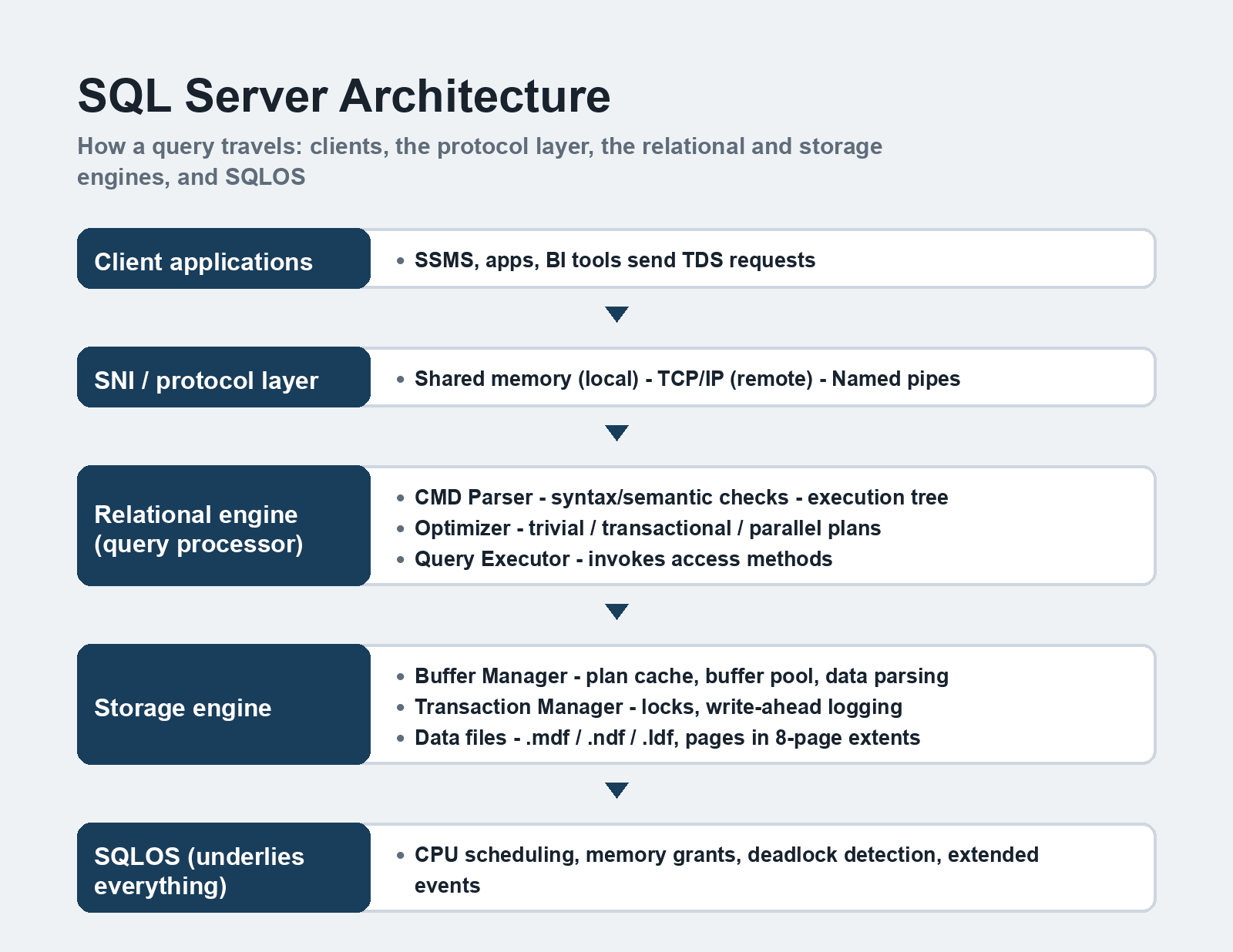
Microsoft SQL Server uses a client-server architecture in which every request follows the same path: a client sends a query over a protocol, the relational engine parses and optimizes it, the storage engine reads or writes the actual data pages, and SQLOS manages the CPU, memory, and threads underneath. Understanding that path is what turns cryptic errors and slow queries into diagnosable problems.
Quick Answer: SQL Server's architecture has four working layers: the protocol layer (SNI) that accepts client traffic over TDS, the relational engine that parses and optimizes queries, the storage engine that manages buffer pools and data files, and SQLOS — the internal operating-system layer handling scheduling, memory, and deadlock detection.
Terminology and version facts in this guide were checked against Microsoft's current SQL Server documentation (including SQL Server 2025), September 2026.
The big picture
SQL Server is best understood as three engines stacked on one scheduler. A request enters through the SQL Server Network Interface (SNI), gets processed by the relational engine (which decides what to do), hands off to the storage engine (which handles how the data is physically reached), and the whole thing runs on SQLOS, the thin operating-system layer inside SQL Server. The separation is deliberate: the query processor can be rewritten without touching storage, and storage can be tuned without touching the parser.
The protocol layer: how clients talk to the server
The SNI is the door in. Clients — SQL Server Management Studio, application drivers, BI tools — package queries into Tabular Data Stream (TDS), an application-level protocol, and the SNI delivers them over one of three transports:
- Shared memory — the simplest and fastest path, used by default for local connections on the server itself.
- TCP/IP — the workhorse for remote connections, and the one every networked application uses.
- Named pipes — an older transport for LAN setups where it's explicitly enabled.
One correction to older guides (including earlier versions of this article): the VIA protocol is gone. Microsoft deprecated it years ago and removed it from the product entirely — if a legacy deployment guide tells you to configure VIA on a modern server, the guide predates the removal and the setting no longer exists.
The relational engine: the query processor
The relational engine is where SQL gets turned into a plan. It has three stations:
CMD Parser. Receives the TDS stream, checks the query's syntax, then checks its semantics — do the tables and columns actually exist, does the user have permission. A query that passes both checks is converted into an execution tree, the internal representation the optimizer works on.
Optimizer. Produces the cheapest workable execution plan, and it does so in phases that trade search time for plan quality:
1. Trivial plan — for simple queries where any reasonable plan is obviously right (a single-table lookup), deeper optimization would waste more time than it saves.
2. Transaction-processing search — for typical workloads, testing join orders and index choices against cost estimates from statistics.
3. Parallel and full optimization — for heavy queries, considering parallelism and more exhaustive search.
The plan lands in the plan cache, which is why parameterized queries matter: a cached plan can be reused instead of recompiled, and plan-cache pollution from ad-hoc queries is a classic performance sink on busy OLTP systems.
Query Executor. Walks the chosen plan and asks the storage engine for each row and page along the way, then returns the result stream to the client through the same protocol stack.
The storage engine: where data actually lives
Buffer Manager. SQL Server never reads a disk page twice if it can help it — the buffer pool keeps data pages in RAM, and the Buffer Manager decides what stays. It also manages the plan cache and performs the data parsing that moves pages between disk and memory. Most "the server is slow" mysteries end at a buffer-pool-grant queue or memory pressure tracked here.
Transaction Manager. Handles everything that isn't a plain read: acquiring locks, enforcing isolation, and writing to the transaction log using write-ahead logging — the log record hits disk before the data page changes, which is what makes a crash recoverable. That log discipline is the reason the .ldf file matters as much as the data files.
Data files and pages. SQL Server stores a database across up to three file types: the primary data file (.mdf) — one per database, holding the startup objects — optional secondary files (.ndf) for spreading data across volumes, and the transaction log (.ldf). Inside the files, data lives in 8 KB pages, grouped eight-at-a-time into extents; nearly every storage tuning decision (fill factor, index layout, filegrowth settings) is ultimately about how those pages get used.
SQLOS: the operating system within
Under everything sits SQLOS, the layer that lets the database engine behave like an operating system inside a Windows process. It owns CPU scheduling and I/O completion for threads, enforces memory grants (so a hash join can't starve the whole server), runs the deadlock detection mechanism, hosts external components, and powers Extended Events. When a support engineer asks for scheduler or wait statistics, they're asking what SQLOS has been seeing.
What changed in recent versions
The layered architecture itself has been stable for years — which is why older guides still mostly work — but the engine around it keeps moving:
| Feature | Version | Why it matters |
|---|---|---|
| Intelligent Query Processing | 2017–2022, ongoing | The optimizer fixes plan-quality regressions automatically for eligible queries |
| Accelerated Database Recovery | 2019 | Instant rollback and redo, ending the "long transaction log recovery" era |
| Buffer Pool Parallel Scan | 2022 | Memory-grant scans no longer bottleneck large-memory servers |
| Native vector type + AI functions | SQL Server 2025 | Vectors, embeddings, and model invocation live in T-SQL — GA November 2025 |
| Native REGEX functions | SQL Server 2025 | Pattern matching without CLR workarounds |
SQL Server 2025 shipped in November 2025 and is the version to evaluate for any new deployment; SQL Server 2022 remains in mainstream support and still dominates existing estates. On Azure, the same engine runs as Azure SQL Database and Managed Instance, where the architecture is identical but patching, backups, and some instance-level settings are handled for you.
Tools worth knowing
SQL Server Management Studio (SSMS) remains the default — current releases (SSMS 21 and on) are free, standalone from the database engine, and cover administration, query tuning, and diagnostics. If SSMS leaves gaps in your workflow, third-party suites fill specific roles: schema and data comparison, unit-test data generation, and version-controlled database documentation. Devart's dbForge SQL Tools bundle is a well-known example of that category — worth a trial before buying anything, since most teams need only two or three of the tools rather than the full bundle.
A quieter trend: everything above is scriptable, and the teams with the least downtime treat SSMS as a viewer and do the real work in version-controlled T-SQL migration scripts.
FAQ
Is SQL Server's architecture the same in Azure SQL Database?
The engine layers — SNI, relational engine, storage engine, SQLOS — are the same code lineage, but Azure SQL Database manages the instance layer for you: no direct file layout control, automatic backups, and some server-level features replaced by database-scoped equivalents. Managed Instance is the closer match to an on-premises SQL Server when compatibility matters.
Where does tempdb fit in the architecture?
tempdb is a system database served by the same storage engine, but it's rebuilt on every restart and takes heavy abuse from sorts, spills, and version stores. Modern versions reduce its bottlenecks (memory-optimized tempdb metadata, concurrent PFS updates), but the configuration advice — adequate file count, fast storage — still follows from how the storage engine uses it.
Do I need to understand SQLOS as a developer?
You can write correct T-SQL without it, but you'll debug better with it: waits, schedulers, memory grants, and deadlock graphs are all SQLOS concepts, and every serious performance investigation reads them. A working mental model beats deep internals knowledge for most application developers.
What's the difference between the relational engine and the storage engine?
The relational engine decides what to do — parse, optimize, execute a plan. The storage engine decides how data is physically read and written — buffer pool, locks, log, files. A slow query usually points at the relational engine (bad plan, missing index); a slow system under load usually points at the storage engine (memory pressure, I/O latency).
Related reading
- Essential SQL commands for developers
- How to resolve SQL Server Error 3417
- Validating SQL Server to PostgreSQL migration
When a query misbehaves, walk the stack the way the query does — protocol, plan, pages, scheduler — and the failing layer usually names itself.