Live streaming keeps growing into the serious-money tier — most analyst estimates put the market's growth above 20% a year through the decade — and growth like that attracts more than audiences. It attracts hijackers, restreamers, credential-stuffing bots, and the occasional extortion DDoS aimed squarely at a scheduled event. The 2024 version of this guide treated security as a platform-features checklist; this one adds what actually matters most in 2026 and what the checklist missed: your own account, which is where almost every real stream takeover begins.
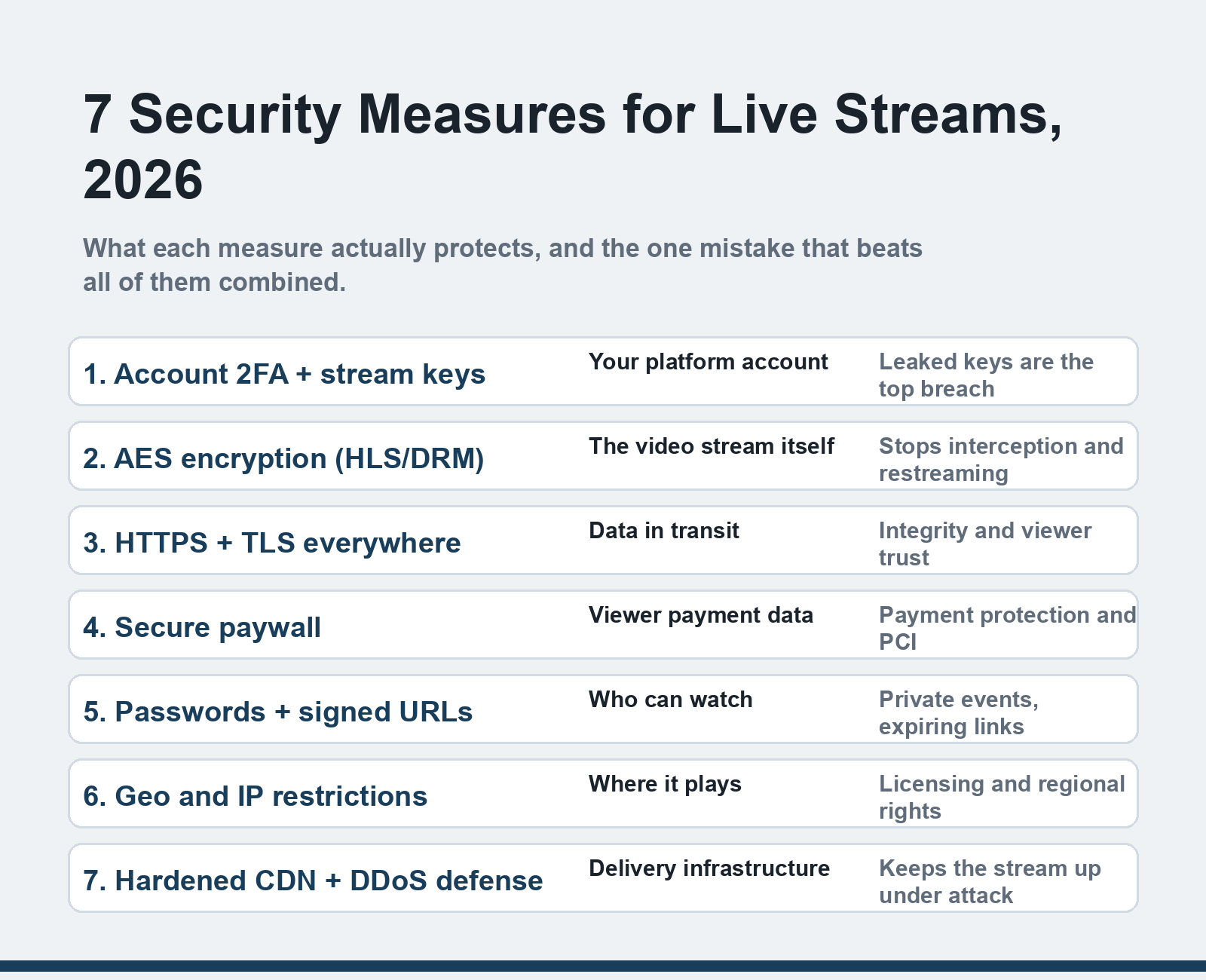
Quick answer: Secure a live stream in 2026 with seven layers: 2FA and protected stream keys on your account, AES/DRM encryption for the video itself, HTTPS/TLS delivery, an encrypted paywall for paid events, passwords and signed URLs for access control, geo/IP restrictions for licensing, and a hardened CDN with DDoS defense. Platform features cover most of this — account hygiene is on you.
Public or private: know which problem you're solving
Everything below starts with one decision. Public streaming (the default on YouTube, Twitch and their kind) trades control for reach — your security job is protecting the account, the content's integrity, and your viewers. Private streaming — internal town halls, paid classes, ticketed events — adds access control: passwords, invite links, expiring signed URLs. Decide first, because the two problems need different tools, and a platform's security page usually conflates them.
1. Lock down the account: 2FA and stream keys
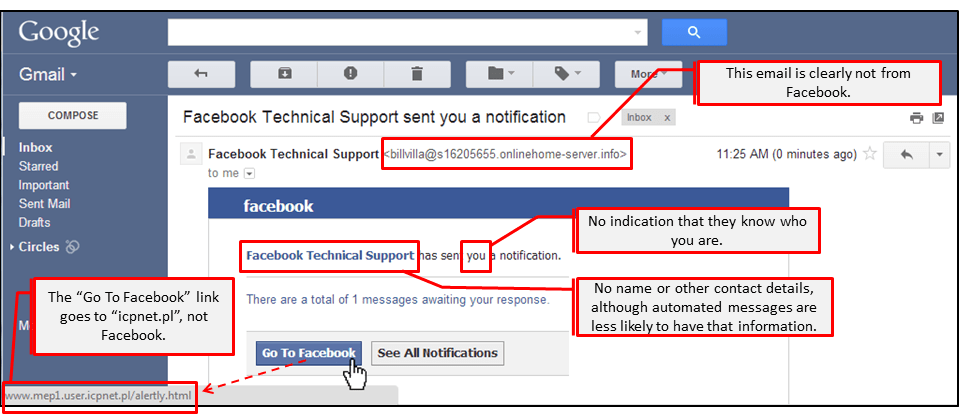
The old list never mentioned this, and it's the measure that matters most in practice. Stream takeovers rarely involve breaking encryption — they involve a phished account, a reused password, or a stream key pasted into the wrong window. Enable two-factor authentication on every platform account (YouTube, Twitch, Kick, your self-hosted panel — all of them support it), treat your stream key like a password — anyone holding it can broadcast as you — and reset it after any suspected leak, device sale, or over-curious screen share. When a major channel gets hijacked mid-stream, this is the layer that failed.
2. AES encryption — protecting the stream itself
AES encryption scrambles the video so intercepted traffic is useless without the keys. On modern platforms this isn't a toggle you set — HLS delivery (the standard protocol for most streaming) encrypts segments with AES-128 by default, and premium video platforms layer DRM on top: Widevine for Android/Chrome, FairPlay for Apple. What you should verify as a creator or business: your paid content isn't going out as plain unencrypted HLS that any viewer-side tool can capture and restream. If you run your own infrastructure, enable encrypted HLS and keep the key server out of the public internet.
3. HTTPS everywhere — non-negotiable in 2026
HTTPS is TLS-wrapped delivery: it proves viewers are talking to your real site, guarantees the stream isn't modified in transit, and is table stakes for anything that handles logins or payments. Browsers now punish non-HTTPS pages with warnings, and mixed-content embedding breaks players outright. For streaming specifically, make sure the embed pages and the player's data calls are both HTTPS — a secure player embedded on an insecure page leaks the protection you paid for. Any platform worth your money does this by default; self-hosted setups are where gaps hide.
4. The paywall: protect the payment, not just the video
If viewers pay, your security surface includes their card data — which means PCI DSS compliance territory. The practical version for streamers and businesses: never handle card numbers yourself. Use the platform's native paywall (Vimeo, Uscreen and similar handle compliance for you) or a payment processor's hosted checkout (Stripe, Razorpay, PayPal), where card data never touches your server. An SSL-encrypted checkout is the minimum; tokenized, processor-hosted payment is the standard. This is also the layer where receipt fraud and refund abuse live — keep purchase records tied to viewer accounts.
5. Passwords, signed URLs and token authentication
For private streams, a password is the floor, not the ceiling. The better mechanism in 2026 is signed URLs — viewer links that embed a cryptographic token with an expiry time, so a shared link stops working after the event or after its TTL lapses. Modern platforms combine this with domain and referrer restrictions (your player only runs on pages you approve — this is the modern version of the old "referrer restriction" item, and it stops embed scraping). For ticketed events, issue unique tokens per purchase; when a link leaks, you revoke one viewer, not the event.
6. Geographic and IP restrictions
Geo-restriction sounds like an enterprise feature until you're streaming a region-licensed sports event, a country-specific product launch, or content with different rights per territory. Platforms let you allow or block by country, and some support IP-range rules for corporate use — an internal all-hands restricted to your office VPN range, for instance. One honesty note from the field: geo-restriction is licensing enforcement, not privacy — determined viewers route around it, so don't rely on it as your only access control for sensitive content.
7. The CDN layer: DDoS defense and redundancy
Delivery infrastructure is the layer viewers feel when it fails. A reputable CDN absorbs volumetric attacks that would drown a single origin server, and in 2026 extortion-style DDoS against scheduled live events is a real, recurring pattern — the attacker hits your stream at opening keynote precisely because everyone's watching. Prefer platforms running hardened CDNs (Cloudflare, Akamai, Fastly front-ends), keep an origin-failover path for self-hosted setups, and for high-stakes events ask your platform directly what their DDoS posture is. Our guide to streaming with a VPN covers the viewer-side of that network story, and for the business meeting use case, our virtual meeting security checklist pairs directly with this one.
The two-minute audit
Run this before your next stream: 2FA on and recent backup codes saved; stream key reset if it's older than your last security review; player page HTTPS; paywall handled by a processor, not your server; private links set to expire; geo-rules checked for the event's actual licensing; and a known fallback if delivery dies. Every item above is minutes of work — the incidents they prevent cost days.
FAQ
What's the most common way live streams get compromised?
Account takeover — phishing emails targeting creators, reused passwords, and leaked stream keys, not broken encryption. That's why 2FA and stream-key hygiene sit first in this list. Technical attacks on the video itself are rarer because taking over an account is easier.
Do I need DRM for my streams, or is AES enough?
Depends on the threat. AES-encrypted HLS stops passive interception and casual capture tools, which covers most private and internal streams. Commercial content worth reselling — courses, sports, film — justifies full DRM (Widevine/FairPlay) because it adds device-level key protection that survives sophisticated restreaming. Most platform paywalls bundle DRM at higher tiers.
How do I stop people from sharing my private stream link?
Use signed URLs with short expiry windows and unique tokens per viewer rather than one shared password. Links then die on their own schedule, and a leaked token gets revoked individually. Domain restrictions add a second lock: even a copied embed only plays on your approved pages.
Can DDoS attacks really take down a live stream?
Yes — scheduled live events are attractive DDoS targets precisely because the audience is locked to a time window. Platform-hosted streams ride on large CDN networks that absorb most attacks; self-hosted streams without DDoS protection are genuinely vulnerable. If the event's revenue depends on uptime, get the platform's DDoS posture in writing before signing.
Is geo-blocking reliable for licensing compliance?
It's the standard tool and contractually expected, but it's enforceable-grade, not bulletproof — VPNs defeat it for determined individuals. Pair geo-restriction with watermarking for high-value content so leaks are traceable, and keep your platform's geo reports as the compliance record.
Security for streams is a pre-flight checklist, not a product you buy once — run the two-minute audit above before every event and you'll dodge the incidents that make the news.